1442E - Termometer Taylor - Gratis brugsanvisning og manual
Find enhedens vejledning gratis 1442E Taylor i PDF-format.


Brugerspørgsmål om 1442E Taylor
0 spørgsmål om dette apparat. Besvar dem du kender, eller stil dit eget.
Stil et nyt spørgsmål om dette apparat
Download vejledningen til din Termometer i PDF-format gratis! Find din vejledning 1442E - Taylor og tag din elektroniske enhed tilbage i hånden. På denne side er alle dokumenter nødvendige for brugen af din enhed offentliggjort. 1442E af mærket Taylor.
BRUGSANVISNING 1442E Taylor
ALARM
Alarm Sound Pattern (Same pattern for temperature high / low and probe unplugged alarm)
1 second (beep, beef) -> silence for 5 seconds -> 1 second (beep, beef) -> silence for 5 seconds ..... Temporal status is updated during the silent 5 seconds. Alarm keeps sounding until it is turned off by pressing. The "PASSWORD" button once. The function of the "PASSWORD" button is just for stopping the alarm when the alarm sounds.
KEY TONE
The key tone will sound when a key is pressed for a valid function.
PHYSICAL
- Battery cover removable with screwdriver only.
- Unit to be water splash resistant (P-XH).
- Velcro kit for mounting to outside unit.
Thank you for purchasing a Taylor® Recording Thermometer with dual probes. This product is an example of superior design and craftsmanship. This product will be low user to record and monitor temperature and would be ideal for most hospitals, environments. Please read this instruction manual carefully before use. Keep these instructions handy for future reference
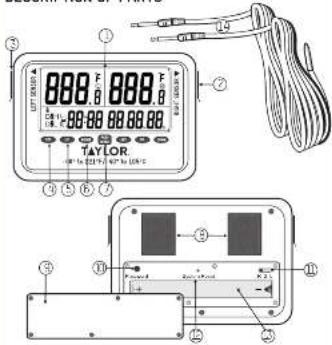
DESCRIPTION OF PARTS
SPECIFICATIONS
1) temperature measuring range -40/105°C, -40/221°
2) Operating temperature range = -20°C to 60°C / -4°F to 140°F
3) Accuracy / 7°F for 4°F to 212°F, / 4°F for other ranges
4) Power: 2 x AOA balleries
5) Resolution 0.1°C / °F
6) Display: 2 lines readout
7) Number of Probes - 2, or a for each channel, each 6 feet in length. Each probe works separately
8) Pitch design - PVC wire and stainless steel probe with PVC material molded around the area joining the PVC wire and the stainless steel probe. Temperature tolerance of the probe wire is 105°C / 7211°
B) Probe waterproof standard: (IPC7)
10) Indicator - low battery
11] "For indicating the data is for left probe."
121 "R": for indicating the cate is for Right proba
131 Memory recall. provide ability to store at least 3 days and maximum 4 days of planning readings.
141 A: alarm event records will be kept in the memory even if the battery dies. The user needs to change new batteries when the icon of battery-low appears.
151 Total 120 alarm records. 60 alarm records per probe.
DESCRIPTION OF PARTS BATTERY INSTALLATION
- LCD read out
- Right screen port
- I off cannot part
- Left SET button
For setting target temperature set points; confirming setting operation; scrolling alarm records. - Left UP balloon
For scrolling the alarm events; increasing the displayed value. - Left DOWN button -
For scratching the alarm events; decreasing the displayed value. - 'Pass Word button -
For accessing the unit, new password setting and turning off the alarm sounds. - Velcro holding end mounting pads
- Battery compartment cover
- Password reset button
- Right, left and dual display switch
- System Reset button
- Ballary placement success
- Sensor Probes
ONE YEAR LIMITED WARRANTY
Taylor & Wartner is this product to be free from defects in material or workmanship for one 11 year from data of original purchases. It does not cover damages or waste resulting from accident, misuse, abuse or underitized adjustment and/or repair. If service is required, do not return to retailers. Should this product require service for replacement at our second, please pack the item carefully and return it prepaid, along with store receipt showing the data of purchases and a note explaining reason for return to
Taylor Precision Products
2220 Entrada Del Sol, Suite A
Las Cruces, New Mexico 88001
Customer Service Phone: 1-866-843-3905
www.taylorusa.com
there are no express warranties except as listed above. This warranty gives you, specific legal rights, and you may have other rights which vary from state to state.
For additional product information, or warranty information outside the USA, please contact us through www.baptourea.com.
Made to our exact specifications in China.
© 2017 Taylor Precision Products and its affiliated companies, all rights reserved. Taylor® and Leading the Way in Accuracy® are registered trademarks of Taylor Precision Products and its affiliated companies. All rights reserved.
142E 6.1779C
The Taylor's recording thermometer with dual probes operates on (2) AAA batteries
1. Use a small phillips head screw driver to loosen the E small screws that hold the battery compartment cover in pieces.
2. Remove the compartment cover.
3. Install (2): AA4 batteries into battery recess. Place the negative side of the batteries with the right side orientation for both as shown in the Figure #1
4. Replace the compartment cover and tighten screws. Do not over tighten or turn the screws in the wrong direction as this may strip the screws threets in the battery door.
Loosen but do not remove screws
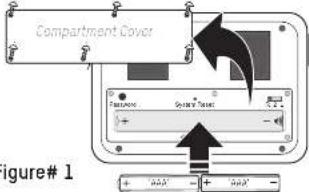
NOTE: Please recycle or dispose of batteries per user, regulations. WARNING: But-cause may pass a checking bazar. As with all small items, we not let children handle batteries. I swallowed, seek medical attention immediately. PRECAUTION: Or no disease of batteries in line. But as we may replace it keys. Remove the batteries if the thermometer will not be used for a long period of time.
TAYLOR.
INSTRUCTION MANUAL
MODEL 1442E
Recording Thermometer with Dual Probes
GENERAL OPERATIONS
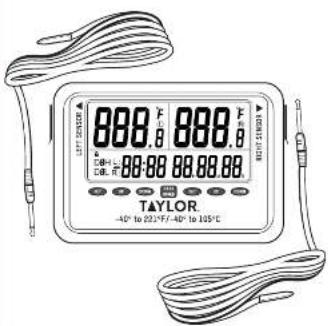
- There are two individual removable probes and jacks on either side of the instrument. Remove protective tag from jacks and plug in probes. Make sure Right-Lift-Due, display switch is in the central position before turning on thermometer.
- There is one display with a two line readout on the top line is for temperature display. The left area is for left probes, the right area for right probes. The bottom line is for displaying the clock 1/24 hour format only, and if the status of the probes or the alarm event records. The right part of the bottom line 36H839R855 is also for warm delay time setting. For example, when the delay time is set to "00H154330S" and the temperature exceeds the limit that the user set, the alarm will not sound unless the temperatures have exceeded the set temperature for 25 minutes 36 seconds. The delay time can be set from 00H007M0C15 at 10:30 PM in 25 hours to 10:00 PM in 50 min. After the temperature exceeds the set temperature but does not show that the lower range than the set delay, then the sound alarm will never occur out the information as it is reported. The "1" is for showing that the data displayed is for the left probe; the "R" is for showing that the data displayed is for the right probes.
- There are one "Pass Word" button and two sets of "SET"/ "UP"/ "DOWN" buttons on the pane.
A. There are no "on" and "off" buttons on the unit, the unit works when the batteries are installed.
GENERAL OPERATIONS CONT. GENERAL OPERATIONS CONT.
-
Press both buttons "UP" + "Down" at the same time for Celsius and Falverbell until so action. Default is "F."
-
There is one three-position slice switch inside the battery compartment. The user can enable the probe by selecting the position of the switch. When the switch is in the "L" position, the self probe is working and the right sensor buttons are enabled. The left probe is operating on the right sensor button, which is not a right probe is working and the left sensor buttons are functionless. When the switch is in the middle position, both probes are working and all buttons are functions. The probe should be plugged into. He will all the first stage as it is needed. Position of the side switch should be in the correct position before being in mind. Emerging the left switch position requires relevant results that may be built by re-installation of a battery of assessing the system reset button, which is also inside the battery compartment.
-
If the probe is enabled (through the slice soil or) and is unplugged during unit powering up or setup, the alarm will beed and FFF will be dispersed in low corresponds ding probe; turn display area. The unit cannot be set up until the probe is plunged in again.
- During normal operation, when the probe is unplugged, the EEE Long and duration of the probe being unplugged will be recorded. The alarm will beaped during the probe is unplugged. After the probe is inserted again, the operation for that probe resumes.
B. During the time the probe is plugged in an unplugged, the temperatures recorded at that moment may not be accurate. In these temperatures meet the temp high/low settings, they will be written to the alarm records together with the "I-II" alarm record, and the users need to filter out these un-accurate temperature records themselves. - The "Password Reset" button is inside the battery compartment. Pressing the button once will reset the password to "88:88".
DEFAULT DISPLAY AND OPERATION PROCEDURE AFTER UNIT POWER UP CONT.
The night behind the second displays: "H" and the left sound side of the bottom line displays "Set" and a flashing "R" or "L" indicating that the right or left probe is being set. Increase or decrease the high alarm set point by pressing the "UP" or "DOWNW" buttons for the second step, then the first step is 3 seconds, the rest forwards function is activated. When the desired high alarm set point is reached, press the "SET" button to confirm high alarm set point and the high alarm set point stops flashing. Then "00H00M00S" or the previous high alarm seley starts flashing on the right hands side of the bottom line to relay the setting. Press "UP/DOWN" buttons for the second step. Press "UP/DOWN" buttons for the first step, then the fast forward function. Press the "SET" button to confirm the second set. Hour digital snap flushing and no signal on Minuta and second digit continue to flash. Press "UP/DOWN" buttons for Minuta setting. Pressing down the "UP/DOWN" buttons for second step, then the second step, then press the "SET" button to confirm the Minuta setting. Hour and minute digital snap flushing and the remaining Second digit continues to flash. Press "UP/DOWN" buttons for Second setting. Pressing down the "UP/DOWN" buttons for more than 5 seconds after press the fast forward function. Press the "SET" button to confirm the second step, then press the second step. All this point, the high alarm set point and delay are set.
C. The temperature display then displays the flashing default (SET) for previous low alarm set point, and the digit behind the decimal will display "L". Increase or decrease the value by suppressing the "UP" or "DOWN" button. When the "UP" or "DOWN" button is pressed down for more than 2 seconds, the fast forward function is on badad. When the device has alarm set point is pressed, press the "SET" button again to confirm the low alarm set point, and the low alarm set point stops flashing. Now the one switch is pressed down for more than 2 seconds, then press the high alarm set point. Then possible the low alarm as point will keep flashing after the "SET" button is pressed for low alarm set point confirmation. Then "OH00H0005" or the previous low alarm delay starts flashing on the right hand side of the
- The "System Reset" button is inside the battery compartment. The user can reset the unit, any time for installation of the unit or in case the unit does not start up after installation of the batteries. After this button is pressed, the unit will go through the normal power up installation process, and all settings have to be re-arranged. Only the old alarm records in there are only can be retrieved after system reset. The operator may use a paper clip or similar type of object for accessing the system reset button. Note: Old alarm records may be retrieved after hitting System Reset button, but when alarm settings are re-entered old records will be deleted.
DEFAULT DISPLAY AND OPERATION PROCEDURE AFTER UNIT POWER UP 1. ALL CT segments are displayed for 3 seconds and the alarm sounds for 1 second.
- Then, current temperature is displayed default is "F," left hand side of the bottom line displays "88:88", right hand side of the bottom line displays a flashing "00H00M00S"
- The unit entee is the clock setting route ( Flash 00-100/400). Press "UP/DOWN" buttons for Hour setting. Pressing down the "UP/DOWN" buttons for more than 5 seconds each moves the last forward function. Presses the "SET" button to confirm the Hour setting. Hour digit to step flashing and the remaining Minute set and Second digits continue to flash. Pressing down the "UP/DOWN" buttons for more than 5 seconds activates the fast forward function. Presses the "SET" button to confirm the Minute setting. Hour and minute digit to stop flashing and the remaining Second digits continue to flash. Presses "UP/DOWN" buttons for Second setting. Pressing down the "UP/DOWN" buttons for more than 5 seconds activates the last first function. Presses the "SET" button to confirm the Second setting. Lock digits stop flashing and start to tick Left or right or both sides buttons can be used for clock setting depending on which arc(s) is enabled.
DEFAULT DISPLAY AND OPERATION PROCEDURE AFTER UNIT POWER UP CONT.
bottom line for low alarm delay setting. Presses "UP/DOWN" buttons for Hour setting. Pressing down the "UP/DOWN" buttons for more than 2 seconds to indicate the fast forward function. Presses the "SET" button to confirm the Hour setting. Hour digit step, second, and first, then, in order to press down the "UP/DOWN" buttons for first, last. Presses "UP/DOWN" buttons for Minute setting. Pressing down the "UP/DOWN" buttons for more than 3 seconds activates the fast forward function. Presses the "SET" button to confirm the Minute set setting. Hour and Minute digital step flashing and the "UP/DOWN" buttons for Second setting. Pressing down the "UP/DOWN" buttons for more than 3 seconds occurring. The fast forward duration. Presses the "SET" button to confirm the Second setting. Presses the "UP/DOWN" buttons for second, lasting at all the point, the low alarm, and its delay 1 me are set.
d. Once the high 2 low alarm and delays are set, the left hand side of the bottom line displays "Set" "R" or "L" indicating that the right or left probe is already set. The display then returns to the nominal display of current temperature, the clock, and "Set" "R" or "L" or "2".
e. Respect the above settling procedure for another anchor when appropriate. † both probes are set, the normal display should show the current temperature of both probes, the clock, and 'Set2'.
ALARM RECORDS
When the temperature saw the high point or below the low point, the alarming events are recorded. There are maximum 96 Hours alarm history showed in memory. In the normal display mode, press the "SET" button once to display the last alarm event. When the current displayed alarm event is the last one, pressing "UP" with, struck the alarm event back to the olded alarm event. For example, if the olded alarm event is 00 R:14:15 A 40°F (high temperature alarm occurred on the current day at 14:35). Pressing the "UP" button once displays 00 R:14:18 A 40°F. The maximum temperature recorded during alarm period was 40°F at 14:16.
DEFAULT DISPLAY AND OPERATION PROCEDURE AFTER UNIT POWER UP CONT.
- After the clock is set, the unit enters the password setting mode flashing "88:68". Left or right or both sides but one can be used for setting depending on which probability is enabled.
(I) Press the "Up" or "Down" button for selecting the number from 1-8 or "first digit" the first press of "Down" charges the digit from 6 to 7; the first press of up changes the digit from 8 to 9. For example, 5 is selected. Pressing the "Set" button again contains 5 and the other lines segment will remain missing.
(III) Press the "Up" or "Down" button for selecting the number from 6-9 (ax.4 is to be selected), press the "Set" button again confirms it, and the other two segments will remain flashing.
(iii) Press the "Up" or "Down" button for selecting the "number" from 0-6lex.3 is to be selected, press the "Set" button again the 3 is confirmed and, he last 6 still flashing.
(iv) Press the "Up" or "Down" button for selecting the number from 0-9 tax,2 is to be selected, press that "Set" billion eqcn the 2 is confirmed and the Password "54:32" is set.
(v) The password display will show the set status of the probes: "Set0" meaning that none of the probes is set. After the password is set, the user can lock the unit by pressing the "PASSWORD" button once. When the unit is locked, the "LOCK" icon on the display will be locked on to indicate that password has to be reentered again for accessing the unit.
(vi) After the unit is locked, the user has to enter the password to express the unit. Press the "PASSWORD" once, flashing "88:88" appears on the 'all' hand side of the button line. Enter the password by following the set password procedure. If the password is correct, the password will stop blinking after the last digit entry and the display will revert to "SetLR/2/0". All buttons are flexible of this line. Therefore, the password will just keep blinking and the password entry process has to re-start again from the first password digit.
ALARM RECORDS CONT.
Pressing the "UP" button again will display. JD is 14:18 00000m/Sec. the temperature went back into safe range at 1/16, and the duration of the alarm was 7 minutes. 23 seconds. Pressing the "UP" button again will move to next record. Pressing and holding the "UP" button for 3 seconds achieves the fast forward function. The alarm events are soicated backward by assessing the "DOWN" button once. Pressing and holding the "DOWN" button for 2 seconds activates the fast backward function. The fast displayed alarm wood will view on the display of 15 seconds. The fast records the normal display of 15 seconds. The "UP" set "R/LZ/20" is a time since the alarm event's display made, the only way to exit to the normal display mode is to set for the 15 seconds alarm event time out of when a new alarm event occurs. The frequent use of display for the
corresponding power should be the risk of only displaying the temperature data associated with the alarm record when in alarm events display mode. The self-high 7 law alarm function is disabled in the alarm events display mode, i.e., even though the user presses the "SET" for 3 seconds, the unit will not add the alarm events set mode.
When there is no alarm records, "nr" inc records' will be displayed on the lower left line of display when the "SET" button is pressed (clock is still displayed on the lower right line). Normal display mode is
the als in records can't be deleted, unless new alarming set points are set. It always stops between 60 hours records in the memory. The oldest als in record will be replaced by the new one when the memory is full.
When the new high and/or low alarm value is set, the memory will clear all the records and start to record the new alarming date from zero.
here are total 120 alarm records, 60 alarm records per probe.
ALARM RECORD FORMAT
Example of alarm records:
INITIAL SETTINGS: High alarm = 40.0°F
Low alarm - 32.0°
High alarm delay = 27 minutes
Low alarm delay = 30 minutes
DEFAULT DISPLAY AND OPERATION PROCEDURE AFTER UNIT POWER UP CONT.
Vill) the default password of the unit is "86:88", the first change of the password will be recerted as the new password in open the password is Farction, the User has to open the battery color and press the "Password Reset" but then on the battery compartment and the password will be reapted to the carval password of "86:88". The user has to open the password "86:88", to start a new password, the User has to reset the Unit or re-inate. The battery. The Unit will start the whole setup procedure silver system reset or battery installation. All previous settings will be lost except that the old alarm event records are still re-evaluation. The high 2 low alarm set points and delays are not only available for any other type of access. For example, if the delay time should not be set for old alarm records, retrieves, as new alarm settings will clear the old alarm memory contents. The old alarm records will only be cleared after the alarm temperatures and delay setting is complete. The unit will quit the alarm setting mode automatically during the alarm activities. The old alarm settings must be missed for 2 minutes. This way the old alarm records are preserved.
- Once the clock and password are said, this end enters the ramp-up display mode. The status of the probe setting is displayed on the left front bottom line of the ICD as "Set0", "Set1", "Set2", or "Set2". The user can enter the set high / low alarm events mode at second alarm events mode from the normal display mode. If the user does not set the high / low alarm set points, the unit will not record any alarm events and will just display the current temperatures.
I'll Set High/Low Alarm set point:
a. The result high/low alarm set points are 10.0^ and 32.0^ respectively while the default delay time is 30-DCMOS for both high and low alarms.
b. To set the alarm set points and corresponding delay times, press down the "SET" button on left or right side for 5 seconds, the corresponding temperature display will display the default high [40.6°F] or previous high alarm set point and flash.
EXAMPLE ALARM RECORD FORMAT:
124.16:35 31.1°F (high of the dry, one 30.1°F at 138.20km, 30.1°F being raised in a perical setting) 124.17:22 67.1°F (low of the dry, one 67.1°F at 137.30km, 137.3°F being raised in perical setting)
24.5°C, 23.0°F (high at the day; was 28.6°F at 11.00 ay, 29.5°F is destroyed in temperature display)
38. 12.2, 53.7 = 1.6 of the term 33.2 = 13.9 to 22.4, 22.0 F in case that is expeditant of error
2.1.10.01.117 [p1:2017] pre-terpials to confound 31.1 - 31.1, required to converge
叶10-2174
1.46.30 52.107 (e.g. per person in blood) 26:51 - 61.91.21; 52.107 is per person
2. Line 30 00h10m 15s events back on 4/9 F or 2x 230pm after 4 hours and 15 seconds of
[1] 1.2.3.4.5.6.7.8.9.10.11.12.13.14.15.16.17.18.19.20.21.22.23.24.25.26.27.28.29.30.31.32.33.34.35.36.37.38.39.40.41.42.43.44.45.46.47.48.49.50.51.52.53.54.55.56.57.58.59.60.61.62.63.64.65.66.67.68.69.70.71.72.73.74.75.76.77.78.79.80.81.82.83.84.85.86.87.88.89.90.91.92.93.94.95.96.97.98.99.100
2.18:00 20.2°C, 16:00:23 m bar/min or at before 22.0°F, 2.0°C in a bickel, 1000000 d
1. 11:56-87:19:24 in [m a r t] + 11:37:06:37:11:00, 11:57:06:37:11:00, 11:57:06:37:11:00
[0][6,2016]
-12.39 (14.00) 68) 112.15 (27.9)
1.20-10:33+7 a 100% (a) 22% + 5.105% (a) 2 beng, and 1
teng.011
4.2(10)
1. 2011, 2012, 2013, 2014, 2015, 2016, 2017, 2018, 2019, 2020, 2021, 2022, 2023, 2024, 2025, 2026, 2027, 2028, 2029, 2030, 2031, 2032, 2033, 2034, 2035, 2036, 2037, 2038, 2039, 2040, 2041, 2042, 2043, 2044, 2045, 2046, 2047, 2048, 2049, 2050, 2051, 2052, 2053, 2054, 2055, 2056, 2057, 2058, 2059, 2060, 2061, 2062, 2063, 2064, 2065, 2066, 2067, 2068, 2069, 2070, 2071, 2072, 2073, 2074, 2075, 2076, 2077, 2078, 2079, 2080, 2081, 2082, 2083, 2084, 2085, 2086, 2087, 2088, 2089, 2090, 2091, 2092, 2093, 2094, 2095, 2096, 2097, 2098, 2099, 2100
1.20% 30% 20% 20% 10% 10% 30% 40% 10% 30%
1. 2018年1月1日
(2) 1981
1. 2017年1月1日,公司以5%的股权为基准价,以每股净资产为计算公式。
[1] 2011年1月14日(星期二)上午13:30-15:00(星期三)下午13:30-15:00(星期四)下午13:30-15:00(星期五)下午13:30-15:00(星期六)下午13:30-15:00(星期七)下午13:30-15:00(星期八)下午13:30-15:00(星期九)下午13:30-15:00(星期十)下午13:30-15:00(星期十一)下午13:30-15:00(星期十二)下午13:30-15:00(星期十三)下午13:30-15:00(星期十四)下午13:30-15:00(星期十五)下午13:30-15:00(星期十六)下午13:30-15:00(星期十七)下午13:30-15:00(星期十八)下午13:30-15:00(星期十九)下午13:30-15:00(星期二十)下午13:30-15:00(星期二十一)下午13:30-15:00(星期二十二)下午13:30-15:00(星期二十三)下午13:30-15:00(星期二十四)下午13:30-15:00(星期二十五)下午13:30-15:00(星期二十六)下午13:30-15:00(星期二十七)下午13:30-15:00(星期二十八)下午13:30-15:00(星期二十九)下午13:30-15:00(星期三十)下午13:30-15:00(星期三十一)下午13:30-15:00(星期三十二)下午13:30-15:00(星期三十三)下午13:30-15:00(星期三十四)下午13:30-15:00(星期三十五)下午13:30-15:00(星期三十六)下午13:30-15:00(星期三十七)下午13:30-15:00(星期三十八)下午13:30-15:00(星期三十九)下午13:30-15:00(星期四十)下午13:30-15:00(星期四十一)下午13:30-15:00(星期四十二)下午13:30-15:00(星期四十三)下午13:30-15:00(星期四十四)下午13:30-15:00(星期四十五)下午13:30-15:00(星期四十六)下午13:30-15:00(星期四十七)下午13:30-15:00(星期四十八)下午13:30-15:00(星期四十九)下午13:30-15:00(星期五十)下午13:30-15:00(星期五十一)下午13:30-15:00(星期五十二)下午13:30-15:00(星期五十三)下午13:30-15:00(星期五十四)下午13:30-15:00(星期五十五)下午13:30-15:00(星期五十六)下午13:30-15:00(星期五十七)下午13:30-15:00(星期五十八)下午13:30-15:00(星期五十九)下午13:30-15:00(星期六十)下午13:30-15:00(星期六十一)下午13:30-15:00(星期六十二)下午13:30-15:00(星期六十三)下午13:30-15:00(星期六十四)下午13:30-15:00(星期六十五)下午13:30-15:00(星期六十六)下午13:30-15:00(星期六十七)下午13:30-15:00(星期六十八)下午13:30-15:00(星期六十九)下午13:30-15:00(星期七十)下午13:30-15:00(星期七十一)下午13:30-15:00(星期七十二)下午13:30-15:00(星期七十三)下午13:30-15:00(星期七十四)
[ ]
Leihen "11.18" 407-32" 20.22" Cleving, not an other 19.51" and a
e(47) (148:18)
Estimates: 10,108.34 = 2.07 - 6,101.12 = 2.57 - 1.03; output, production, up from 21.20% of total
[1] 10:00 25:15'45 in 13:00-05 by be###now and show of degree. 17 F is drawn in
Гаранов 0157 42851
1.1.10.912
2016.7.19-4
12 L 11:40 Thursday 4:25 hours were on day 30 at 40 o. 11, 4th-8am cct. 1 hour 40m rutes 45 seconds a
11.00:25 (a) 28.00:25 (b) 36.00:25 (c)
2016.12.1
(1) 2013: 1958-04-06 2014年12月25日
Note: Use of thermogenic reservoir analysis of the current exercise temperature over the temperature unit, when the record was taken. For example, the end of temperature was 10°C when the actual recorded an alarm event, and that alarm event is discarded in 10°C after the current temperature unit is 1°F and the main record is being installed back.