
ANOR5G20WT - Udendørs antenne NEDIS - Gratis brugsanvisning og manual
Find enhedens vejledning gratis ANOR5G20WT NEDIS i PDF-format.


Brugerspørgsmål om ANOR5G20WT NEDIS
0 spørgsmål om dette apparat. Besvar dem du kender, eller stil dit eget.
Stil et nyt spørgsmål om dette apparat
Download vejledningen til din Udendørs antenne i PDF-format gratis! Find din vejledning ANOR5G20WT - NEDIS og tag din elektroniske enhed tilbage i hånden. På denne side er alle dokumenter nødvendige for brugen af din enhed offentliggjort. ANOR5G20WT af mærket NEDIS.
BRUGSANVISNING ANOR5G20WT NEDIS
3G /4G LTE / 5G Outdoor External Antenna
ANOR5G20WT
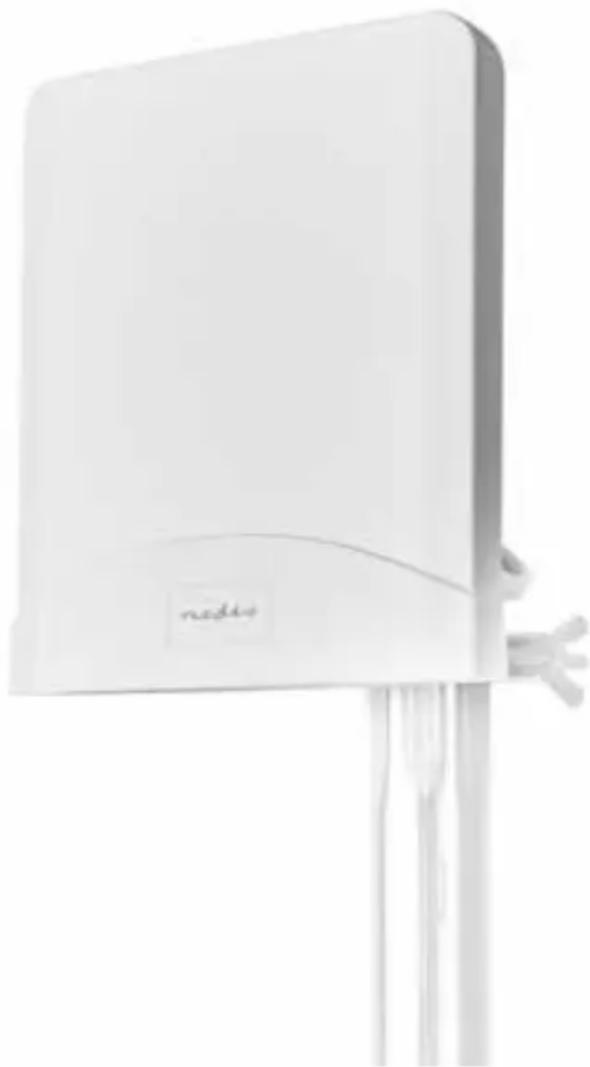
natural_image
White electronic device with a label 'nadio' and abstract curved design, mounted on a stand (no readable text beyond the label)INTRODUCTION
Thank you for choosing our 5G high gain directional external antenna. This antenna is designed to enhance the performance and signal strength of your 5G-enabled devices. Please read this manual carefully before installing and using the antenna to ensure optimal performance. Compact and stylish housing, it can be accompany with your cpe and sim card router or Cell Phone Signal Boosters.
Technical Specifications:
• Covered Services: 3G / 4G / 4G LTE / 5G
• Frequency: 698 - 960 / 1710 - 2700 / 3300 - 3600 / 4800 - 5000 MHz
- Gain: 4\~6 dBi
- High Directionality
- Cable fixed at antenna RG58U 1 ft N-type connector
- 2 x 2.50M LMR200 cable fixed at antenna with SAM-male connector
- Waterproof: IPX3
- Anti-UV housing
- Pole installations method
PACKAGE CONTENT
Please check the content before your installation
- Antenna x 1 pc
- 2.5m LMR200 Cable x 2 pcs
- Installation Materials
- Manual x 1 pc
INSTALLATION
Outdoor Pole Mounted Installation
Step 1. Read this manual, ideally from start to finish, so that you understand the whole Installation process before you begin.
Step 2. Choose a suitable location for antenna installation with a clear line of sight to the 4G LTE or 5G cellular towers. Use the provided mounting kit to secure the antenna. Ensure a stable and secure mount to prevent movement or damage. For optimal performance, it is recommended to install the antenna outdoors.
Step 3. Locate a wooden pole or metallic pole.
Step 4. Fix the Antenna with the pole by using the supplied installation materials. Connect the LMR 200 cable to the short cable on the antenna.
Step 5. Connect the other end of the LMR200 cable to the 4G or 5G device's antenna port. The device could be a 4G LTE or 5G CPE (Customer Premises Equipment), SIM card router, or cell phone Signal Boosters. Ensure a secure and snug connection to minimize signal loss.
Step 6. Adjust the antenna direction for maximum signal strength. Use a compass or refer to your device's signal strength indicator to find the optimal direction. Gradually adjust the antenna angle and direction, checking the signal strength periodically. Ensure a secure and snug connection to minimize signal loss.
Maintenance and Care:
Regularly inspect the antenna for any signs of damage, corrosion, or loose connections.
Troubleshooting:
If experiencing signal issues, recheck the antenna connection and directional alignment. Ensure there are no obstructions blocking the antenna's line of sight to the cellular tower.
Compliance and Safety Guidelines:
Comply with local regulations and safety standards during installation.
Do not attempt to modify or disassemble the antenna.
Ensure that the installation location is safe and secure.


Mærke : NEDIS
Model : ANOR5G20WT
Kategori : Udendørs antenne