1.8 - Mobiltelefon Alba - Gratis brugsanvisning og manual
Find enhedens vejledning gratis 1.8 Alba i PDF-format.


Brugerspørgsmål om 1.8 Alba
0 spørgsmål om dette apparat. Besvar dem du kender, eller stil dit eget.
Stil et nyt spørgsmål om dette apparat
Download vejledningen til din Mobiltelefon i PDF-format gratis! Find din vejledning 1.8 - Alba og tag din elektroniske enhed tilbage i hånden. På denne side er alle dokumenter nødvendige for brugen af din enhed offentliggjort. 1.8 af mærket Alba.
BRUGSANVISNING 1.8 Alba



Alba 1.8 Feature Phone
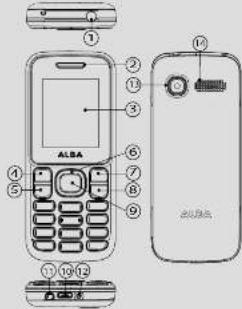
Device buttons
1 Torch 8 End/Power key
2 Receiver/Loudspeaker 9 OK kay
3 Screen 10 USB/Charging interface
4 Left soft key 11 Earphone jack
5 Dial key 12 DC-in jack
6 Navigation key 13 Camera
? Right soft key 14 Back cover
Button description
Last Friday 2014
Beclough, soft key press to perform the function currently displayed in the bottom left/right corner of the screen.
Dial key answers all calls make calls from SIM1/SIM2 card
view call logs in standby mode.
Navigation key: within a menu, press Up, Down, Left or Right
to scroll, through menu options. In standby mode, press to
End/Power key: press and hold to turn on/off the device.
end a call of reject an incoming call, return to the standby mode.
(1)
- May press to expand one team's focus on monthly updates, press to confirm a selection.
(1) 2017年1月1日
Numeric key: enter numbers, letters or characters.
Select a submandu item labeled with the corresponding number.
* Key press to popup the symbols screen when entering
text Press and hold the * Key to toggle between *. =. Ipause
Enacted F, and (with Ehranskology) with standard medicine. Pons left 5pft. Key and * Key to lock/lnlock kwayroad. And
long press ^ key you can speed into FM.
# Rev. in standby mode. Long press if key can switch
between the silent mode and General mode.
Press to switch the input methods when entering text.
0 Key: press to enter Space when editing text.
Power on roll the torch
Icon description

Tall. Vericlust data indicate the signal strength of the claim.
position has the best reception

indicates the battery charge level.

- 2017年,公司与上海浦东发展银行股份有限公司签订了《关于使用部分闲置募集资金进行现金管理的协议》。

-

(1) 2017年1月1日,公司与关联方发生的交易金额为人民币4,568.39万元。
Indicates your phone uses the alert type of "Silent".
(二) 与前次交易日的收盘价及成交量的对比
- 2017年1月1日,公司召开2017年第二次临时股东大会,并通知全体董事。
Indicates you are using Bluetooth.
Install the SIM card and battery
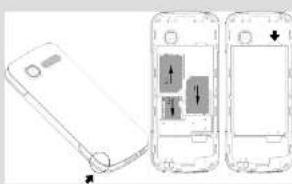
natural_image
Diagram showing two views of a smartphone with internal components, no text or symbols presentCharging the battery
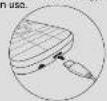
If the battery is completely discharged, you cannot turn
on the phone, even with the charger connected. Allow a
try to turn on the phone. To save energy, unplug the travel
adapter when not in use.
Turning ON/OFF
To turn your phone on,
-
Press and hold
-
Enter your PIN and press OK if necessary
-
When the setup wizard opens, customise your phone as
If the battery remains fully discharged or removed from the
phone, the time and date will be reset.
To turn your phone off, press and hold
Making a call
- In the device's homescreen, enter a phone number
For an international call, do not target to enter the facility code.
-
Press to dial the number
-
To end the call, press
Anschwing a call
-
When a call comes in press —
-
To end the call press
Adjusting the volume during a call
During a call, press the Navigation key UP to increase the
volume and the Navigation key Down to decrease it
Accessing all menus
-
From the homescreen press the OK Key
-
Use the Navigation Key to choose desired operation and
press the OK Key to enter the selected operation.
- You can exit a menu and return to standby mode by
pressing the right sort key of the END key.
Phonebook Call History Organizer
Multimedia Messages File Manager
Profiles Audio players Camera
Famino 400 Texas 100 Texas
Changing your ringtone
-
From the homescreen, press the OK key.
-
Select Profiles.
-
Select the desired profile and select Options with the Left
sonley
- Scroll down to select Settings and press the OK key
- Select Ring settings to change your ringtone
- Select Adjust volume to adjust different volumes
Calling a recently dialled number
-
In the device's homescreen press
-
Scroll left or right to a call type
-
Scroll up or down to a number or name.
-
Press the OK key to view details of the call or dial
the number.
Adding a new contact
- From the homescreen, select the Right soft key to open
the Phonebook
-
Press the Left soft key to open Options, then New.
-
Select the storage location.
-
Enter the contact information and press the Left soft key
to save.
Creating a SMS
- From the homescreen, press the OK key and select
MSSIONS
- Select Write Message and select the OK key to choose a
recipient.
-
Press the Left sort key to select Options, then OK
-
Press the navigation key down to enter text.
option
-
Enter your text.
-
Press the Left soft key to select Options, then Send.
ABC. Abc. abc modes
Press an appropriate sichaturemic key until the character
you want appears on the display.
123 mode
Press an appropriate alphanumeric key to enter a number.
Writing language
Select a language for your SMS.
To use other features for text input
To move the cursor, press the Navigation key.
To delete characters one by one, press Clear
To delete words quickly, press and hold Clear.
To insert a space between characters, press u.
Mobile tracker
Mobile tracker is used for getting the phone number when
someone who uses your phone and change the SIM card in
your phone.
-
Go to App Zone and select Mobile tracker.
-
Type the passwords 1234 and make the status ON
-
Get Foreign numbers
-
3017 (Reconciler Numbers)
What a new son is offered, it's your phone, a sign will be
the number of the new SIM
Default password
The default password for your data protection is. 1234
Transferring flies to/from your compute
-
Connect the phone to a 5G video micro UCD cable inst
-
Washington, the private sector is using a market with similar price provided!
The PC will auto detect the phone as a removable disk
- You can access the device memory to transfer files.
To have a large capacity of storage, you need to install a micro5D card (not provided).
Troubleshooting
Unable to turn on: press the power on key for over 1
second. Check if the battery is properly connected. Please
remove and install it again, retry to turn on. Check if battery
is appropriately charged.
Unable to connect networks weak signal
Please Try and move to a location with strong signal and
try connecting to the network again. Please ensure that you
are not beyond the network coverage of service providers.
Please ensure you have a valid SIM card. Please contact your
network provider for further information.
Poor quality of calling: Please check if the sound volume is
tuned improperly in an area with poor recabining condition.
example basement the signal might have weak Tsuchchina
a location with steepest and curvative and call way
While using the people phone in the game period of
communication. The complete time, may be unable to
call because of line congestion.




Argos declares that this device is in compliance with the essential requirements and other relevant provisions of Directive 1999/5/EC.
A copy of the declaration of conformity can be obtained from:
Argos Ltd.
489-499 Avebury Boulevard
Milton Keynes, MK9 2NW, UK
SAR value : Head (W/Kg) 0.384 Body (W/Kg) 0.366
Alba Phones Helpline
For detailed advice on this or any other issue concerning your Alba phone you can consult with the technical support helpline - 0207 744 0346
PN: 114611 C€0700
Alu 18 Friday Place look tell 2500,500-11-06