RADLS918 - Radio JUNG - Gratis brugsanvisning og manual
Find enhedens vejledning gratis RADLS918 JUNG i PDF-format.


Brugerspørgsmål om RADLS918 JUNG
0 spørgsmål om dette apparat. Besvar dem du kender, eller stil dit eget.
Stil et nyt spørgsmål om dette apparat
Download vejledningen til din Radio i PDF-format gratis! Find din vejledning RADLS918 - JUNG og tag din elektroniske enhed tilbage i hånden. På denne side er alle dokumenter nødvendige for brugen af din enhed offentliggjort. RADLS918 af mærket JUNG.
BRUGSANVISNING RADLS918 JUNG
Flush-mounted radio with display RAD...
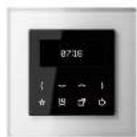
Device descripon
The Jung ash mounted radio RAD... consists of a display cover and a ash mounted power supply unit.
The display cover is used for display and operation. All the songs are made using the 8 sensor buons. The display shows the station information from ROS, the ma and the current songs.
The radio power supply unit contains the connecons for the mains voltage, Inputs and the loudspeaker.
The radio can be operated with one or two LSM... loudspeaker modules.
The extension input allows the radio to be switched on or o, e.g. together with the light.
The radio signal is obtained from the connecon to the mains voltage. In situations where reception is difficult, the oponal cord aerial can be used.
Other audio sources can be played back using an AUX input, e.g. using the music centre MC..100...
Safety informaon
Electrical equipment must only be installed and assembled by qualified electricians.
Failure to comply with these instructions may result in damage to the device, re or other hazards.
This product is only intended for use in dry rooms.
These instrucons are a component part of the product and must remain with the end customer.
Operaon
The lower half of the cover is used for operation. All operation is carried out using 8 sensor buons.
When idle, the buons and display may be hidden, depending on the songs. They are reactivated when the sensor buons are touched again.

Switch-on / Switch-a
The radio is switched on and a here.
If the buon is pressed for 3 seconds when the system is switched on, then the sleep mer (fall asleep funcon) can be acvated.
Songs
Basic congrureon of brightnesses, alarm me, and much more.
Alarm funcons
The alarm, which has a gradually increasing volume, is switched on and o here.
If the buon is pressed for longer than 3 seconds, this opens the menu for sending the alarm ma.
Favourites
Preferred staons can be saved to the Favourites or the AUX input selected.
Operang buons
Staon search, volume seng and the navigation/ seng in the menu
Brightness of display during standby
adjusts the brightness for the
The lowest level is Night made.
Night mode
In Night mode, the display is switched a completely as standby.
Pressing any buon brings the display back from Night mode.
Main menu
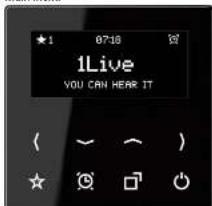
Aer switch on, the station informaon and status line are shown in the display.

The status line provides information on the selected favourites, me and alarm operation.
When idle, this information is reduced to the me and date.
Staon selecon
The next station is selected using the buons.

RDS (Radio Data System)
During operation, the display shows the stoon name and, in some cases, additional information, e.g. on the current song. If this information is not available, then frequency information on the selected radio stoon is displayed.
Adjusting the volume
The volume is adjusted using

Favourites
Driey pressing the 📂 in selects the saved favourites or the AUX Input.
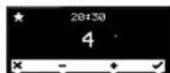
Cancel Select -/+ Conrm

In radio operon, a long press of the buon (> 3 s) adds the current station to the Favourites list. Up to 8 favourites are possible.
Sengs
The submenus can be found using the buon. The menu is operated with the sensor buons below.

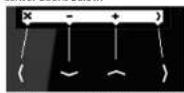
Here you can select one of the following 8 suomenus with the +/- buons.
With the buon you get into the selected suamenu to change required songs.
AUX input
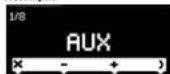
When the AUX input is elevated, radio reception is terminated and playback comes from the external source. If the input is deceased again, radio operation will recommence.
Alarm me
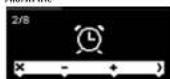
The set alarm me starts the radio with an increasing volume.
The display and buons are previously illuminated at full brightness.

The ■■■ terminate any further
Increase in volume
The on switches the alarm o.
E
The ■ on switches the function and
Sleepmer (Fall asleep funcon)
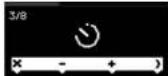
The Sleepmer (fall asleep luncon) switches the radio a automatically aer the selected period of me.
The countdown is displayed in the status line.
Buon brightness
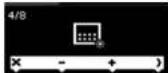
The brightness and switch-o behaviour of the buons can be varied.
On switching-o, the informaon in the display is reduced to the display of staon name and the me.
If the system is operated again, the buons become brighter again.
Brightness of operational display
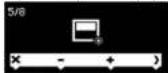
The display brightness can be reduced.
Loudspeaker
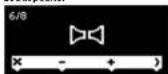
During operation, the radio switches between stereo and mono operation automatically. If reception conditions are variable, it may be wise to select continuous mono operation. This allows two different areas to be lled with sound.
Time
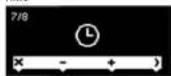
Normally, the reception of an RDS station is suclent to perform this song automatically. However, the current me can also be set manually.
Default seng
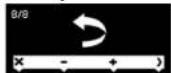
The state as delivered is restored. In so doing, the 8 strongest staons are saved automatically.

Flush-mounted radio with display RAD...
Operang instrucons
Albrecht Jung GmbH & Co. KG
Vollmestrasse 1 58579 Schalksimühle Germany
www.jung.de
We reserve the right to make technical changes. en_RAD_V3.docx 02/2014 0024073100

The CE symbol is a free trade symbol, intended solely for the authorities and does not carry any guarantee of properes.
Guarantee Our products are under guarantee within the scope of the statutory provisions. Please send the device, postage paid, to our central Customer Service Centre, with a descripon of the error.
ALBRECHT JUNG GMBH & CO. KG
Vollmestrasse 1 58579 Schalksmühle Germany
Telephone: +49 2355 806-0 Fax: +49 2355 806-204 kundencenter@jung.de www.jung.de
Service Centre Kupferstr. 17-19 44532 Lünen Germany
Correct use
• Installaon in a ash-mounted device box according to DIN EN 49073 (Recommendation: Deep sockets)
• VHF reception in the frequency range 87.5 MHz to 108 MHz
Product properes
- VHF radio with display and sensor buons - Real glass front panel
• Sterno recepan
- Connecon terminals for two loudspeakers - Stereo/mono switch-over
- Simple operation
- Integrated VHF aerial
• High level of reception quality
• Automac and manual stoon search
• Storage of 8 favourites
- Switch-on with most recent staon
• Switch on with most recent volume
• Alarm funcon
- Sleep mode
- Switch on/switch o using extension
- Opponal external cord aerial
Art. no. RAD-ANT available as accessory
Mounng
The radio RAD... is designed for mounting in ush-mounted DIN EN 49073 sockets.
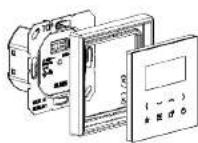
The usn-mounted power supply unit contains the connectors for the mains voltage, loudspeaker and possibly the extension.
The display cover is sacked to the power supply unit together with the frame.

Touching live parts can result in an electric shock.
An electric shock can be fatal. Before working, disconnect all the appropriate cable protecon switches. Cover live parts in the vicinity.
Mains conneccon
The radio requires a permanent mains power connecon.
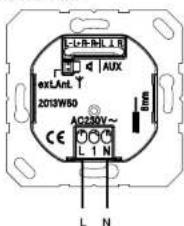
It is not allowed to use the terminals to loop through wires.
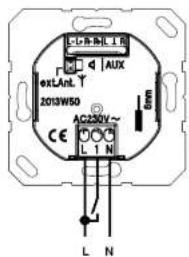
Connecting the extension
The extension connection is used to switch the radio o and on using switches, e.g. together with the light.
The extension input may only be operated with the same phase as the radio.
Connecting an external cord aerial The rear side connection for the external aerial may only be used to connect the cord aerial, art. no. RAD-M&T. Connection to roof aerials of shared aerial systems is not permied.
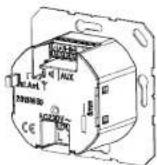
To connect the cord aerial, remove the jumper. Make sure to store the jumper for later use of the radio without cord aerial.
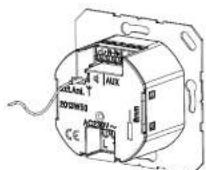
Insert the aerial in the lower connection.
Using the AUX input
The AUX Input is used to connect external sources, e.g. the music centre MC...100...
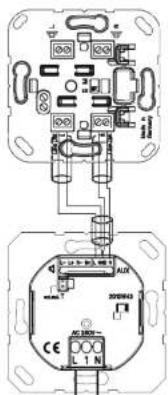
Within the device box, all the cables carrying low voltages (including the oponal cord aerial) must have an insulang hose, in
order to guarantee secure isolation. The AUX input is selected using the Favourites buon or in the menu.
Connecng a loudspeaker
The radio is designed for operation with one or two LSM... loudspeaker modules. The connection cable can be up to 5 m long.
Within the device box, all the cables carrying low voltages must have an insulang hose, in order to guarantee secure isolation.
In normal stereo operation, both outputs (L+R) are used. If necessary, the receiver switches to mono operation automatically.
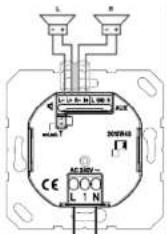
In the case of manual switch-over to mono operation (2 x mono), the radio can also be used with just one loudspeaker.
The connector of multiple loudspeakers to each output is not permitted.
Third-party loudspeakers may only be used if their technical data is identical to the Jung LSM...
Please observe the polarity.
Moung of the power supply unit
Aer connection of all the cables, mount the power supply unit in the device box in the right position.
Mouning of the display unit
Aer the power supply unit has been mounted in the device box, each the display cover, including the frame, to the power supply unit in the right position.
First commissioning
Switch the device on using the 📄 on.
During rst commissioning, the 8 strongest stairs are saved automatically.
If necessary, adjust the songs for the loudspeakers and brightnesses.
Normally the brief reception of an RDS stoen is sadient to set the me and date automatically. Otherwise, the me can also be set manually.
Technical data
Radio RAD...
Rated voltage: AC 230 V
Frequency: 50/60 Hz
Ambient temperature: 0 ... - 50 °C
Humidity: 15% ... 90%
No dew formaon
Frequency range: 87.50 MHz ... 108.00 MHz
Protecon rang: IP 20
Connecan: Screw terminals
1×2.5 mm ^2 or 1×1.5 mm ^2
Loudspeaker conneccon cable:
Twin-core cable H03VH-H, 2 x 0.75
alternatively:
N-[S1]-Y 2x2x0.6 mm
Length: max: 5 m
Loudspeaker LSM...
Rated power: 2.5 W
Impedance: 4 Ω
Frequency range: 120 ... 15000 Hz (-10 dB)
AUX Input:
Impedance: 470Ω
Input level: 1 V