SOHO II - Cykel Valk - Gratis brugsanvisning og manual
Find enhedens vejledning gratis SOHO II Valk i PDF-format.


Brugerspørgsmål om SOHO II Valk
0 spørgsmål om dette apparat. Besvar dem du kender, eller stil dit eget.
Stil et nyt spørgsmål om dette apparat
Download vejledningen til din Cykel i PDF-format gratis! Find din vejledning SOHO II - Valk og tag din elektroniske enhed tilbage i hånden. På denne side er alle dokumenter nødvendige for brugen af din enhed offentliggjort. SOHO II af mærket Valk.
BRUGSANVISNING SOHO II Valk
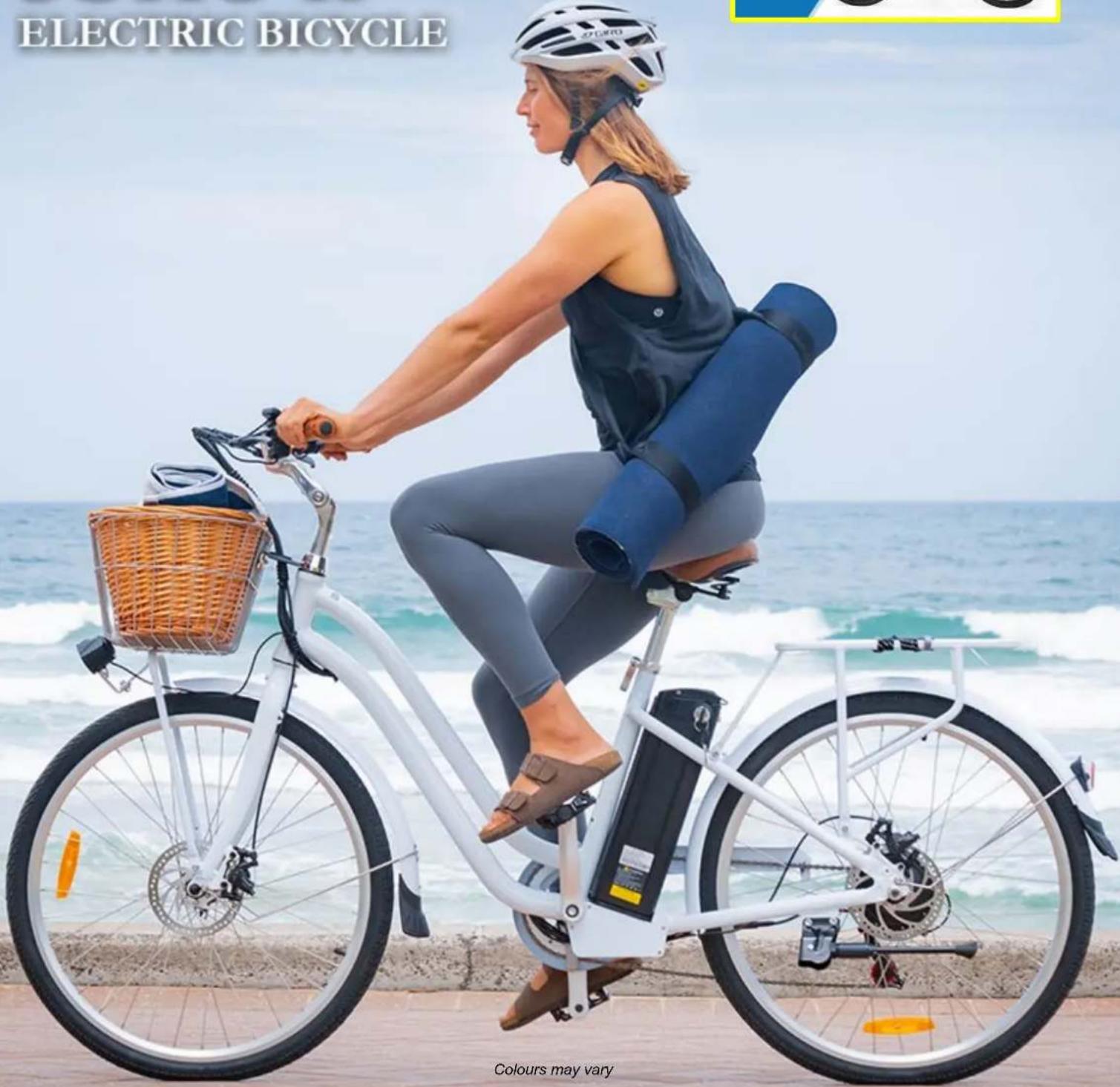
SOHO II
ELECTRIC BICYCLE
User Manual
[Revision 8.0 July 2022]
Please note the user must be pedalling for the motor to activate.
Safety
Video Tutorial: Assembly Guide

- Handle your control, posture, speed etc so that you are able to maintain stability & stopping ability in the event of, loss of traction, loss of power from any condition such as battery exhaustion, control disruption, disruption of balance, moisture, overload cut-out, protection cut-out etc. As with any vehicle or mechanical product, there is always a chance of failure.
- Riding can be a hazardous activity. Certain conditions may cause the equipment to fail without fault of the manufacturer. The product can and is intended to move, and it is therefore possible to lose control, fall-off and/or get into dangerous situations that no amount of care, instruction or expertise can eliminate. If such things occur, you can be seriously injured or die, even when using safety equipment and other precautions. RIDE AT YOUR OWN RISK AND USE COMMON-SENSE. FAILURE TO USE COMMON-SENSE AND HEED ALL SAFETY WARNINGS AND RECOMMENDATIONS INCREASES RISK OF INJURY. USE THE PRODUCT ONLY WITH APPROPRIATE CAUTION AND SERIOUS ATTENTION TO SAFE OPERATION.
- Before riding on the road, take time riding in an enclosed area to familiarise yourself with the controls and behaviours of an electrically assisted bicycle. Try all settings so you are familiar with the results.
- Before every ride, check bicycle condition and ensure that no fasteners are loose, particularly axles, pedals, seat and handlebars. Ensure that the tyres are inflated to within specification (printed on the tyre sidewall), and that the brakes are operating correctly.
• Maximum load capacity = 120kg. - Understand and obey any local laws or regulations which may affect locations where the product may be used. Ride defensively.
- This product is manufactured for performance and durability but is not impervious to damage. Stunts or other aggressive riding can over-stress and damage the product, and the rider assumes all risks associated with how the product is looked after.
- Keep fingers and other body parts away from moving components.
- Always wear suitable protective equipment, such as an approved safety helmet (with chin strap securely buckled). A helmet may be legally required by local law or regulation in your area. Wear suitable footwear for bicycle riding and clothing that helps make you visible to others.
Battery and Charging
- Never modify the electrical system. Alterations could cause a fire resulting in serious injury and could also damage the electrical system.
- Charge with the supplied or recommended charger only. Use of the wrong charger could cause a fire or explosion resulting in serious injury.
- Ensure the voltage and frequency of the charger is compatible with mains electrical supply.
• Use the battery charger in dry locations only. - Regularly check the charger for damage to the electrical cord, plug, enclosure and other parts. If any damage or malfunction occurs, do NOT use the charger until repaired or replaced.
• Use caution when charging. - Do not operate the charger or charge batteries near flammable materials.
• Do not clean or perform any maintenance on the product when it is being charged.
• Use of an incompatible charger or battery may cause a fire.
• Use only VALK/NISHIRO compatible batteries or chargers. - USE OF BATTERIES OR CHARGERS OUTSIDE OF THESE TERMS WILL VOID ALL WARRANTY CLAIMS.
WARNING! KEEP BUTTON BATTERIES OUT OF REACH OF CHILDREN.
- SWALLOWING MAY LEAD TO SERIOUS OR FATAL INJURY IN AS LITTLE AS 2 HOURS DUE TO CHEMICAL BURNS AND POTENTIAL PERFORATION OF THE OESOPHAGUS.
• NEVER ALLOW CHILDREN TO REPLACE BUTTON BATTERIES OF ANY DEVICE. - IF YOU SUSPECT YOUR CHILD HAS SWALLOWED OR INSERTED A BUTTON BATTERY, IMMEDIATELY CALL THE 24-HOUR POISONS INFORMATION CENTRE ON 13 11 26 (AUSTRALIA).
- REGULARLY EXAMINE DEVICES AND MAKE SURE THE BATTERY COMPARTMENT IS CORRECTLY SECURED. E.G., THAT THE SCREW OR OTHER MECHANICAL FASTENER IS TIGHTENED. DO NOT USE IF COMPARTMENT IS NOT SECURE.
- DISPOSE OF USED BUTTON BATTERIES IMMEDIATELY AND SAFELY OUT OF THE REACH OF CHILDREN. A BATTERY CAN STILL BE DANGEROUS EVEN WHEN IT CAN NO LONGER OPERATE THE DEVICE.
- TELL OTHERS ABOUT THE RISKS ASSOCIATED WITH BUTTON BATTERIES AND HOW TO KEEP THEIR CHILDREN SAFE.
Table of Contents
Safety....2
Introduction .... 5
Parts Identification and Assembly......6
Tools Required for Assembly....6
Assembly 7
Handlebars 7
Seat....9
Front Wheel....10
Pedals....11
Ancillary Parts 12
Parts List....14
Operation 15
Pedal Assistance 16
Using Pedal Assistance....16
Understanding the Display....17
Guidelines for Using Pedal Assistance....17
Using Gears....17
Using Brakes....19
Batteries and Battery Charging....21
Removing the Battery Pack....22
Maintenance 23
Battery Storage....24
Battery Fuse 24
Brakes....25
Cable Adjustment....25
Brake Rubber Alignment and Adjustment....26
Brake Rubber Replacement 26
Brake Shoe Replacement....27
Tyre Pressures....28
Chain Care....29
Torque Settings....29
Frequently Asked Questions....30
Troubleshooting....31
Specifications....33
Introduction
Congratulations on purchasing a Valk pedal assisted bicycle. We hope you enjoy years of satisfactory and safe riding.
Read the manual.
This manual is provided to help you to get the best performance, comfort, enjoyment and safety from your bicycle. The manual describes specific care and maintenance procedures that help protect your warranty and ensure trouble-free use. Please pay particular attention to the section on battery charging and maintenance.
Read the manual before assembling and riding your bicycle.
Note that the manual is not intended to be an extensive reference source for servicing, maintenance and/or repairs. For additional assistance, contact an authorised Valk service centre.


In the interests of your safety and the safety of others, it is highly recommended to have your bicycle assembled and serviced / adjusted by a skilled bicycle mechanic.
Parts Identification and Assembly
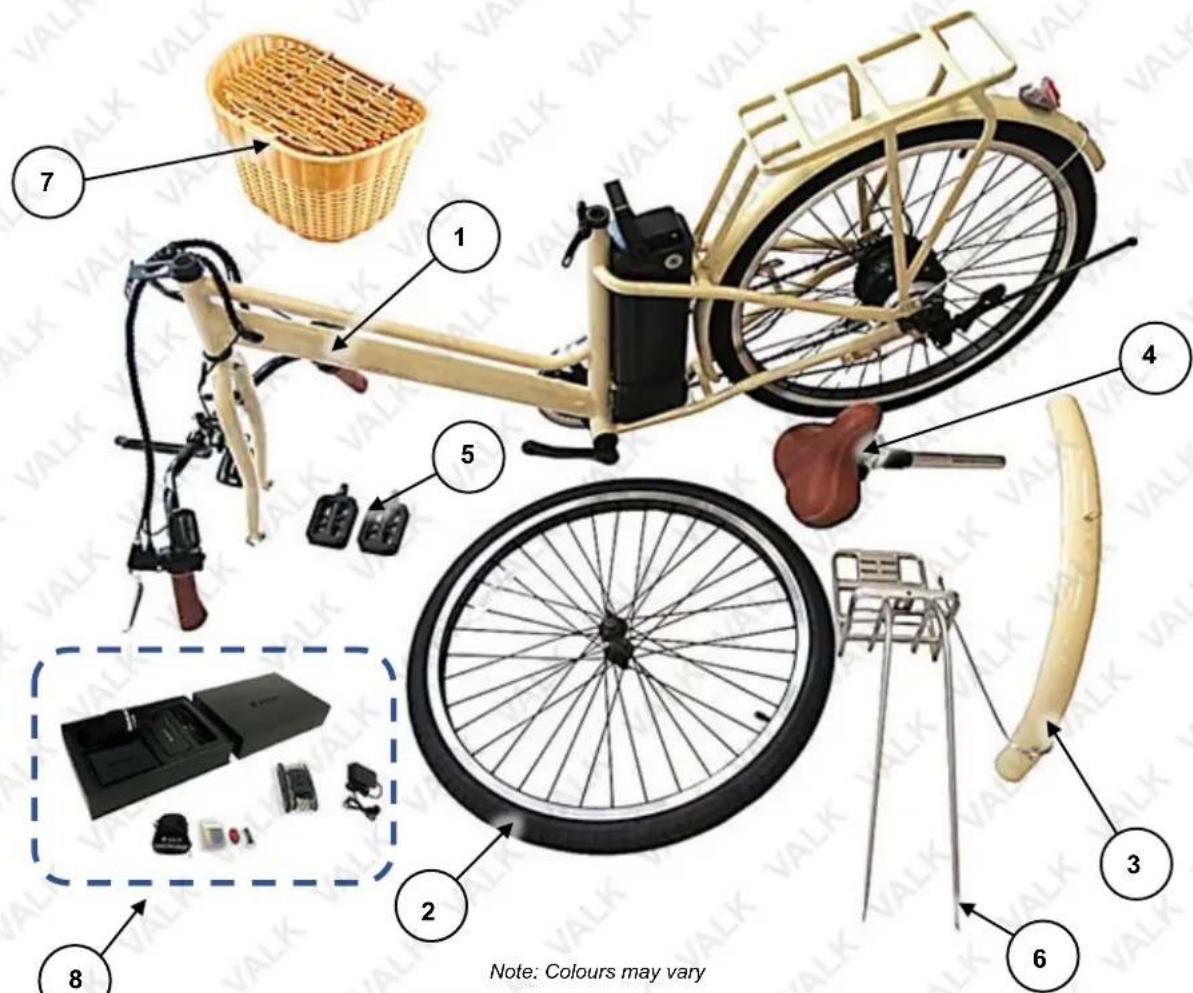
| No. | Name |
| 1 | Bicycle Assembly (Frame, Forks, Handlebar, Crank, Chain, Battery, Motor, Rear Wheel etc) |
| 2 | Front Wheel |
| 3 | Front Mudguard |
| 4 | Seat Post / Seat |
| 5 | Pedals (Left and Right) |
| 6 | Basket Rack |
| 7 | Basket |
| 8 | Parts / Tools / Accessories |
Tools Required for Assembly
The bicycle may come supplied with some tools. Tools required for general assembly and maintenance include, but are not limited to, the following:
• Bicycle torque wrench.
• 8mm / 10mm / 13mm / 15mm / 19mm spanners.
• 2.5mm / 4mm / 5mm Allen keys.
- Pliers.
• Phillips head screwdriver.
Assembly
Video Tutorial: Assembly Guide

Before riding, ensure that all required fasteners are tightened to the correct torque. • This should be checked after every 3 hours of use for the first 20 hours of ownership. • Ensure that the tyres are inflated to within specification (printed on the tyre sidewall), and that the brakes are operating correctly. • Assembly may require 2 people. • Do NOT allow children to perform the assembly. • Additional tools to those supplied (if any) may be required for assembly, such as a torque wrench, pliers etc.
The bicycle comes with some minor assembly required, and may include some necessary tools.
Handlebars
- Carefully place the bicycle assembly on a flat surface so that it rests on the front fork and rear wheel.
- Slide the handlebar stem (A) into the fork tube until fully inserted.
- Rotate the handlebar assembly, if required, so it is aligned "square" to the front fork. That is, the handlebar will be at 90° to the bicycle frame when the front wheel is straight.
- Using a 6mm Allen key and torque wrench, tighten the handlebar stem bolt (B) to the specified torque.
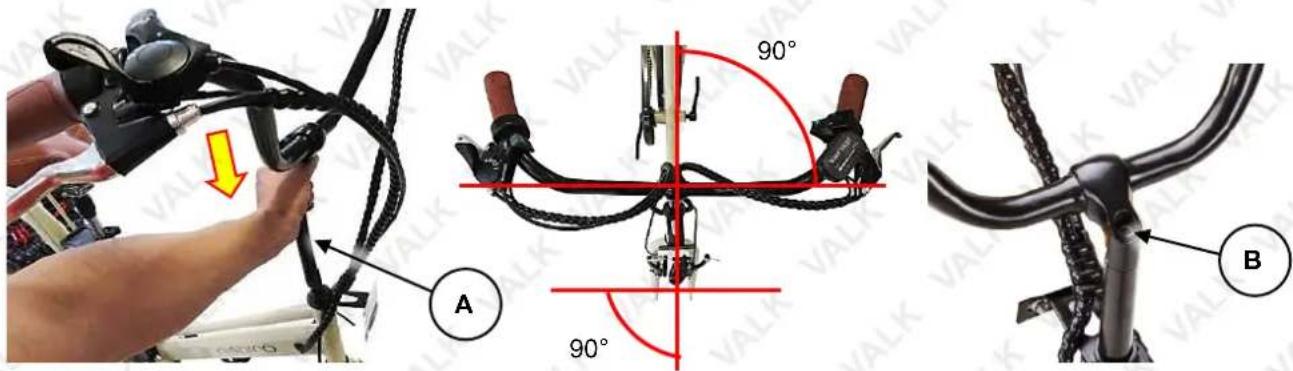
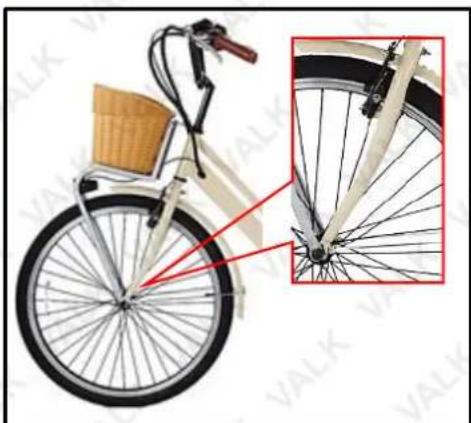
The orientation of the front fork is correct when the brake caliper is facing forward. The orientation of the handlebar is correct when the control cables and brake levers are facing forward. It is ESSENTIAL that the fork and handlebar are assembled correctly. The adjacent image (bicycle shown fully assembled) shows correct fork / handlebar assembly.
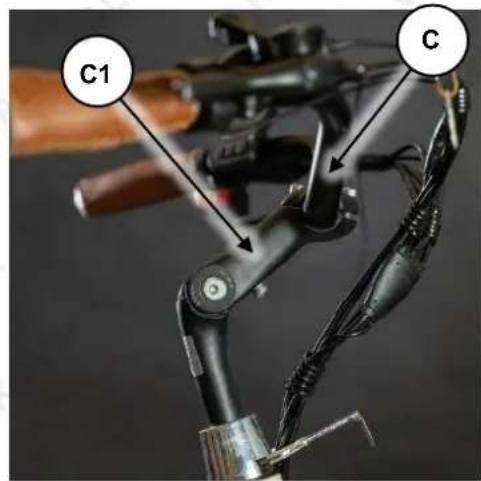
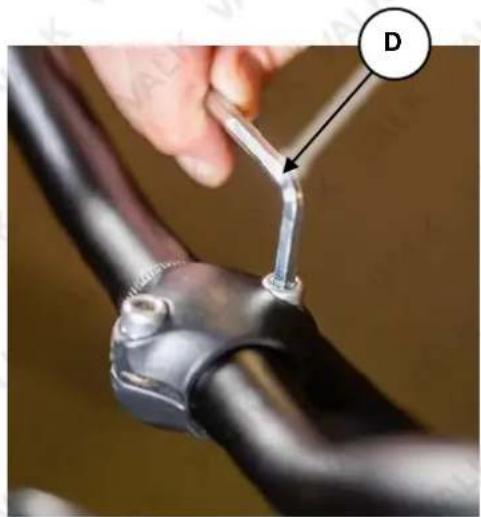
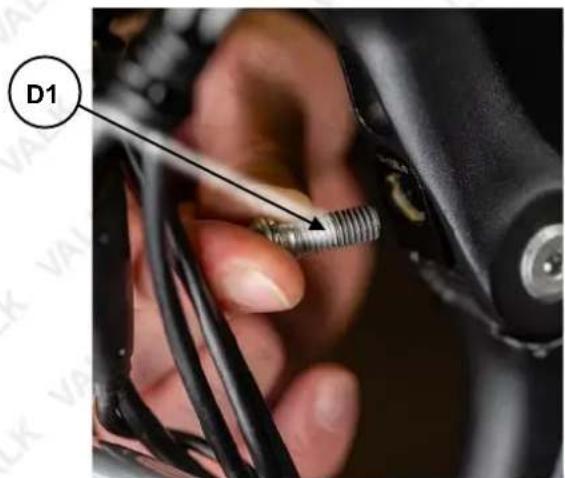
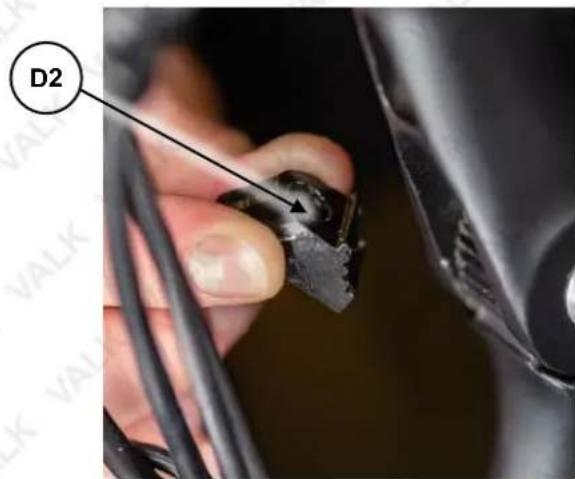
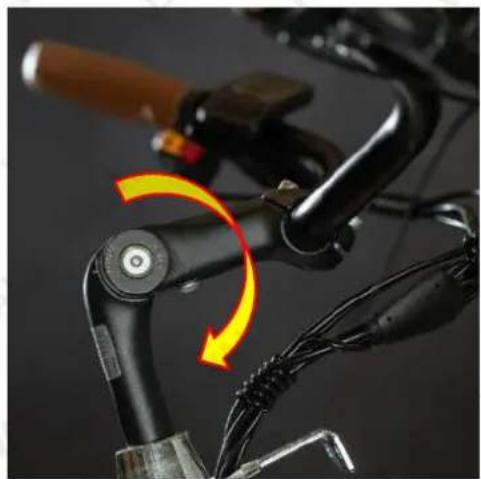
- You can rotate the handlebar tube (C) and handlebar neck (C1) for a more comfortable riding position. Using a 6mm Allen Key, loosen the handlebar tube clamping bolt (D), then rotate the handlebar tube forward or backwards as needed - ensure it remains centred. Using a 6mm Allen Key and Torque Wrench, tighten (rotate right) the handlebar tube clamping bolt to the specified torque. Using a 6mm Allen Key, remove the handlebar
natural_image
Illustration of a bicycle with front wheel and side wheel, showing structural details (no text or symbols)neck lock bolt (D1) and the grip lock piece (D2) from the front of the handlebar neck (C1). Rotate the handlebar neck forward or backwards as needed. Insert the grip lock piece (D2) and handlebar neck lock bolt (D1) back into the front of the handlebar neck and using a 6mm Allen Key and Torque Wrench, tighten (rotate right) the handlebar neck lock bolt to the specified torque.
natural_image
Close-up of a hand holding a metal clip attached to a black metal bracket, with a labeled point D (no text or symbols on the object itself)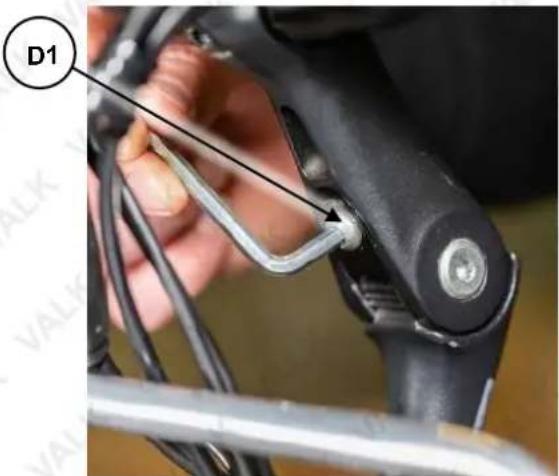
natural_image
Close-up of a bicycle's handle and cable assembly with a yellow directional arrow indicating rotation (no text or symbols)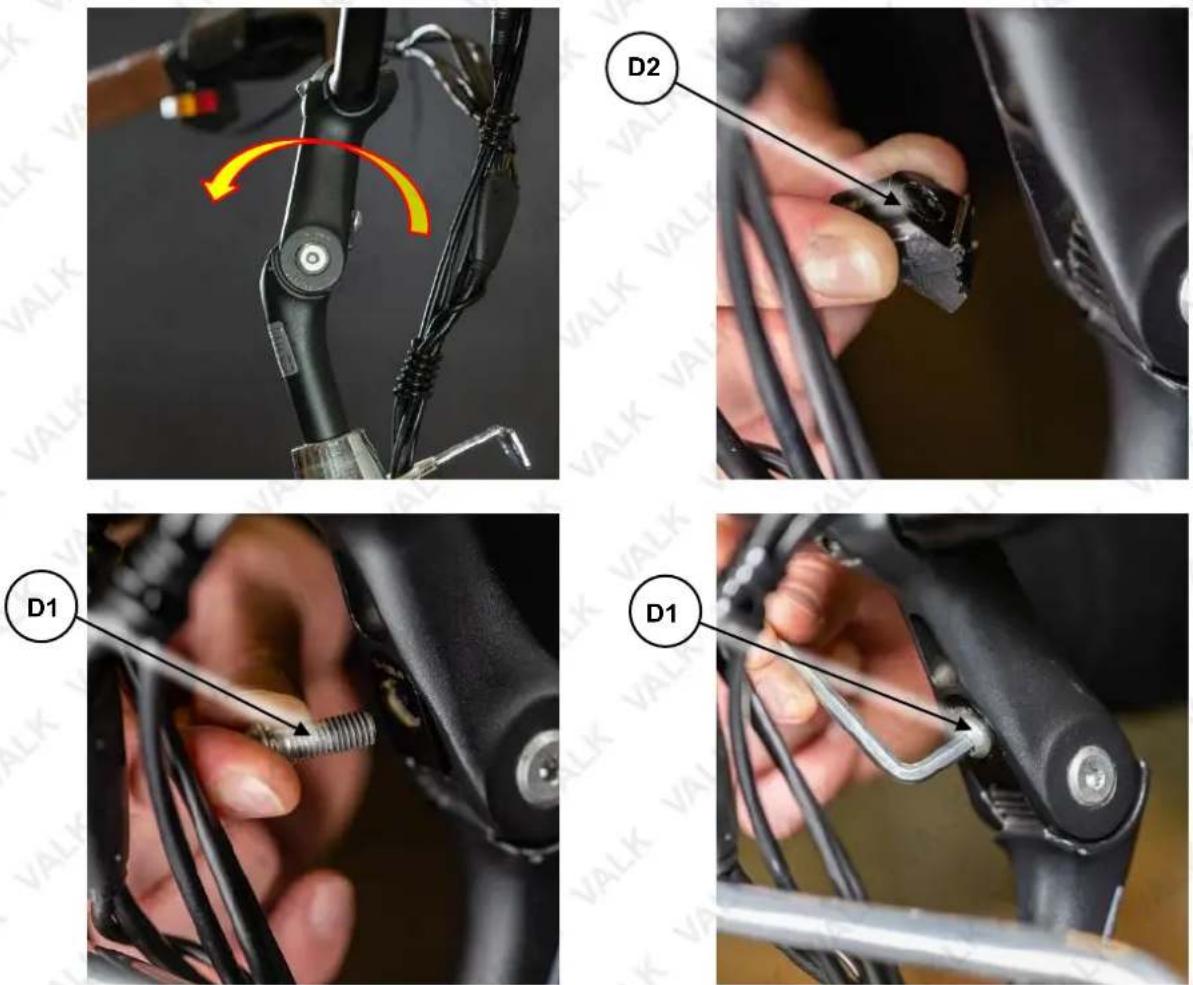
Seat

When setting seat height, it is important to ensure that the resulting ride position is not only comfortable, but also safe. You should be able to remain stable and properly handle the bicycle when at a standstill, touch the ground etc. You should also be able to comfortably reach the pedals
when riding and comfortably and safely operate the handlebars and all controls. A good reference height for the seat is at hip height. Do NOT have the seat raised enough so you can see the maximum height marker on the seat post. • Ensure that when the seat is clamped, you cannot rock it back and forth or rotate it.
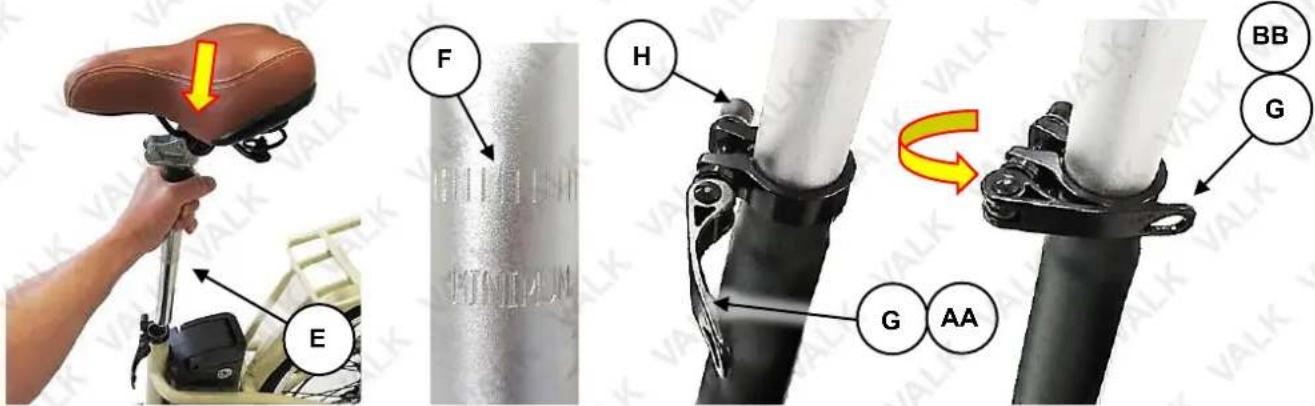
- Insert the seat post/seat assembly (E) into the bicycle frame and lower it to a comfortable position – do NOT have the seat raised enough so you can see the maximum height marker (F) on the seat post.
- Rotate the clamp lever (G) from the unlock position (AA) to the lock position (BB). If the seat post is not clamped firmly, increase pressure by unlocking the clamp, then rotating the adjustment knob (H) right (clockwise) a 14 turn, then re-test and adjust as necessary.
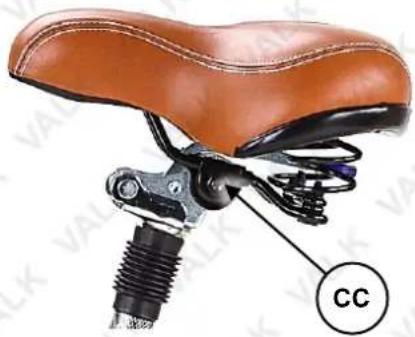
The seat angle can also be adjusted, again for best comfort. To adjust angle, using a 13mm spanner, loosen (rotate left) the seat clamp nuts (CC) on either side of the seat until the front of the seat can be moved up/down. Set the angle as required, then tighten the nuts securely.
Note that small changes in seat position can have a substantial effect on comfort. It is recommended to make seat adjustments in small increments and test the position, then re-adjust as necessary.
natural_image
Close-up of a brown leather bicycle seat with a black screw and labeled 'CC' (no text or symbols on the device itself)Front Wheel
- Turn the bicycle over so it is resting on the handlebar and seat. Remove the black plastic spacer from the wheel fork.
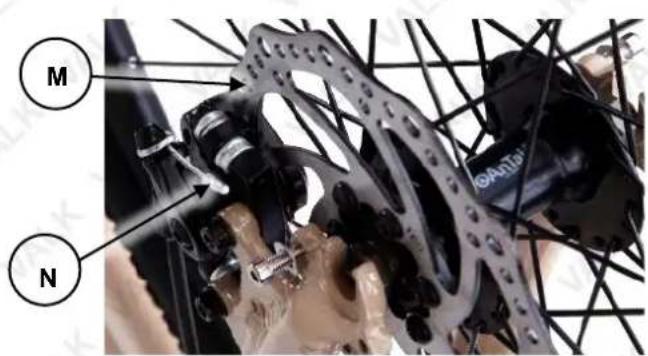
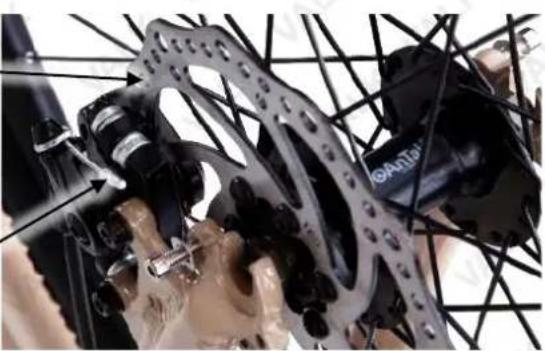
- Install the front wheel by lowering it into the slots at the bottom of the fork legs, making sure that the brake disc (M) sits into slot on the brake pad assembly (N).
- Remove the plastic nut (P) and washer (Q) from the axle skewer (O) and then slide the skewer through the centre of the wheel.
natural_image
Close-up of a mechanical assembly with interlocking gears and components (no visible text or symbols)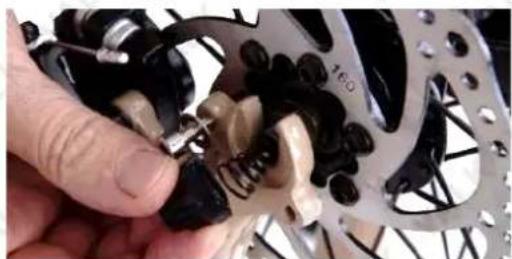
natural_image
Close-up of a hand adjusting a mechanical gear assembly with visible springs and gears (no text or symbols)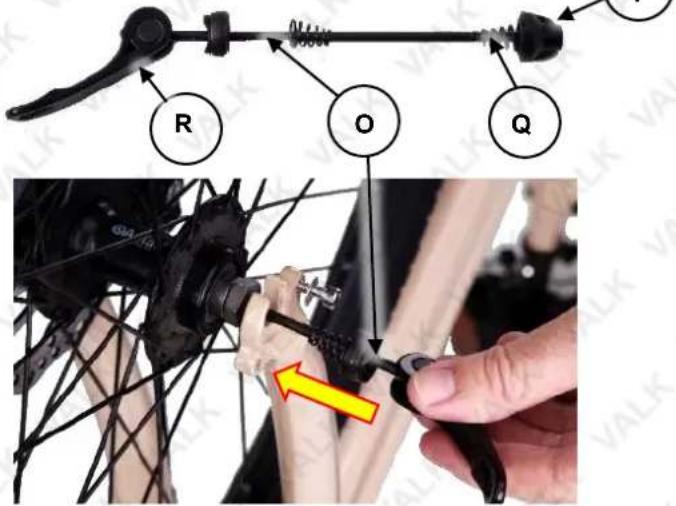
- Fasten the nut and washer back onto the skewer. As you tighten, check the tension on the quick release handle (R), it should require firm pressure to close, locking the wheel in place.
Pedals

It is critical that you follow the pedal to crank arm attachment procedure carefully to ensure correct assembly. During assembly, do NOT use excessive force to screw the pedals into the crank arms – this may indicate misalignment of the pedals or mis-matched threads. If the pedal does not "feel right" when being screwed in, STOP immediately and check that it is the correct pedal and that it is aligned properly with the crank arm. Failure to follow the instructions here or take due care may damage the equipment and void any product warranty.
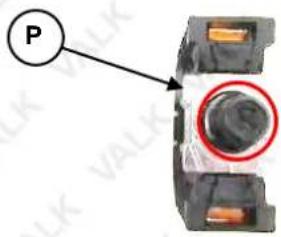
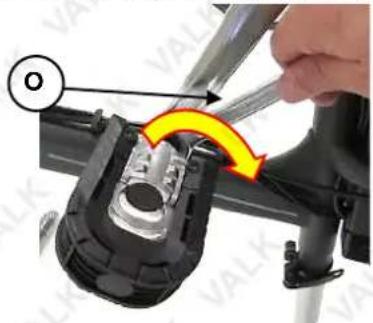
- Starting with the right-hand crank arm (O), identify the right-hand pedal assembly (P), which is identified by having the pedal bolt stamped "R".
- Very carefully begin screwing the pedal bolt into the crank arm (rotate right / clockwise). If the bolt does not "feel right" when being screwed in, STOP immediately and check that it is the correct bolt and that it is aligned properly with the crank arm. Screw the pedal bolt in fully, then tighten to the specified torque (P) using a 15mm spanner and torque wrench.
natural_image
Close-up of a mechanical component with a hand adjusting a yellow arrow, no visible text or symbols- Repeat the above procedure for the left-hand crank arm, noting that the pedal bolt and crank arm thread is left-hand (rotate left / anti-clockwise to tighten) and that the pedal bolt is stamped "L".
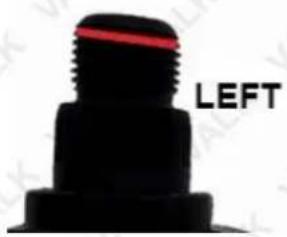
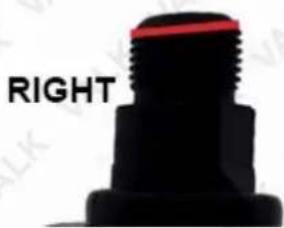
Note: If there are no Left and Right markings on the pedals, sit the pedals side by side and inspect the thread on each. As shown in the image below, the thread on the left pedal starts high on the left side, and the thread on the right pedal starts high on the right side.
Ancillary Parts
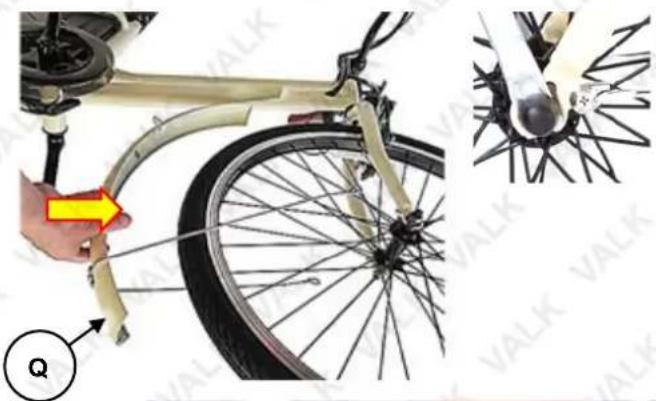
- Place the front mudguard (Q) in position so the "eyes" on the end of the mounting arms align with the holes in the fork legs, and the mounting tab at the top of the mudguard is against the steering head. Secure the mounting arms with the supplied screws, and the mounting tab with the supplied screw and nut (remove the fasteners from the fork legs and steering head first) and firmly tighten (rotate right) using a 10mm spanner.
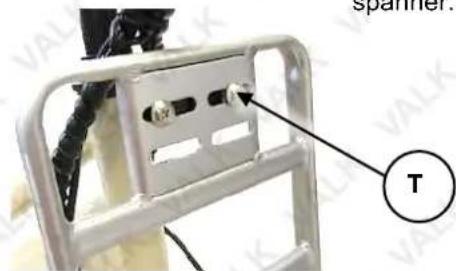
- Place the basket rack (R) in position by lining up the "eyes" in the support legs with the bolt holes on the front wheel fork and secure with bolts, washers and nuts. Then rotate the rack around until it reaches the rack bracket (S). Secure the top of the rack to the rack bracket using 2 M5x20 hex screws and flange nuts (T), and tighten firmly with a 8mm spanner.
natural_image
Close-up of a bicycle wheel assembly with a hand adjusting the cable, alongside a close-up of its mechanical component (no text or symbols visible)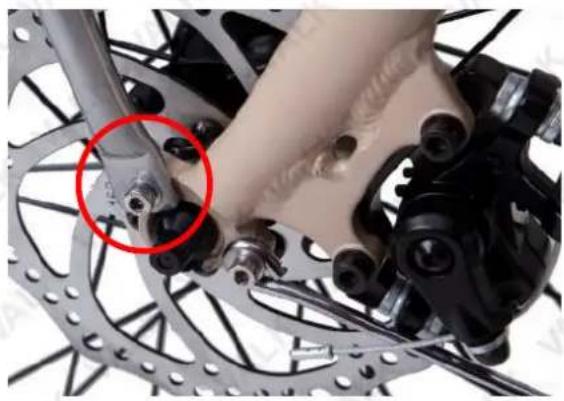
natural_image
Close-up of bicycle brake system components with a red circle highlighting a specific part (no text or symbols visible)- Attach the headlight (U) to the front of the basket rack (R), and secure using 1 M5x20 hex screw and flange nut (T), and tighten firmly with a 8mm spanner.
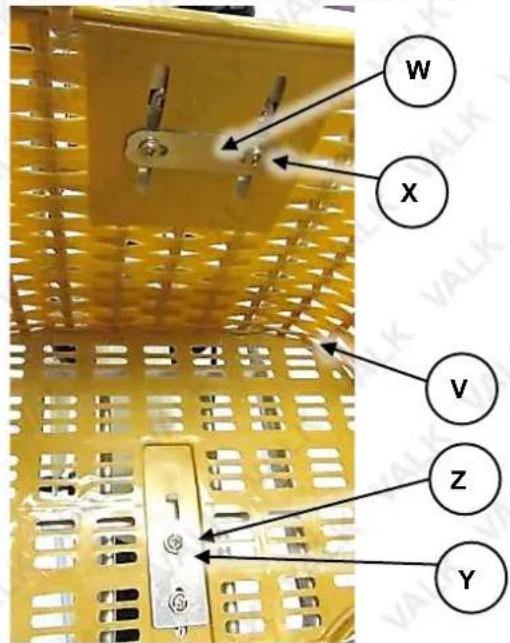
- Place the basket (V) on the basket rack. Attach the rear part of the basket to the rack using the narrow basket bracket (W) and 2 M5x15 screws and nuts (X). Attach the bottom of the basket to the rack using the wide basket bracket (Y) and 2 M5x15 screws and lock nuts (Z).
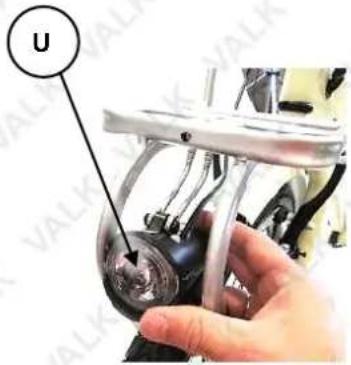
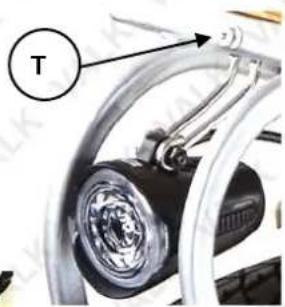
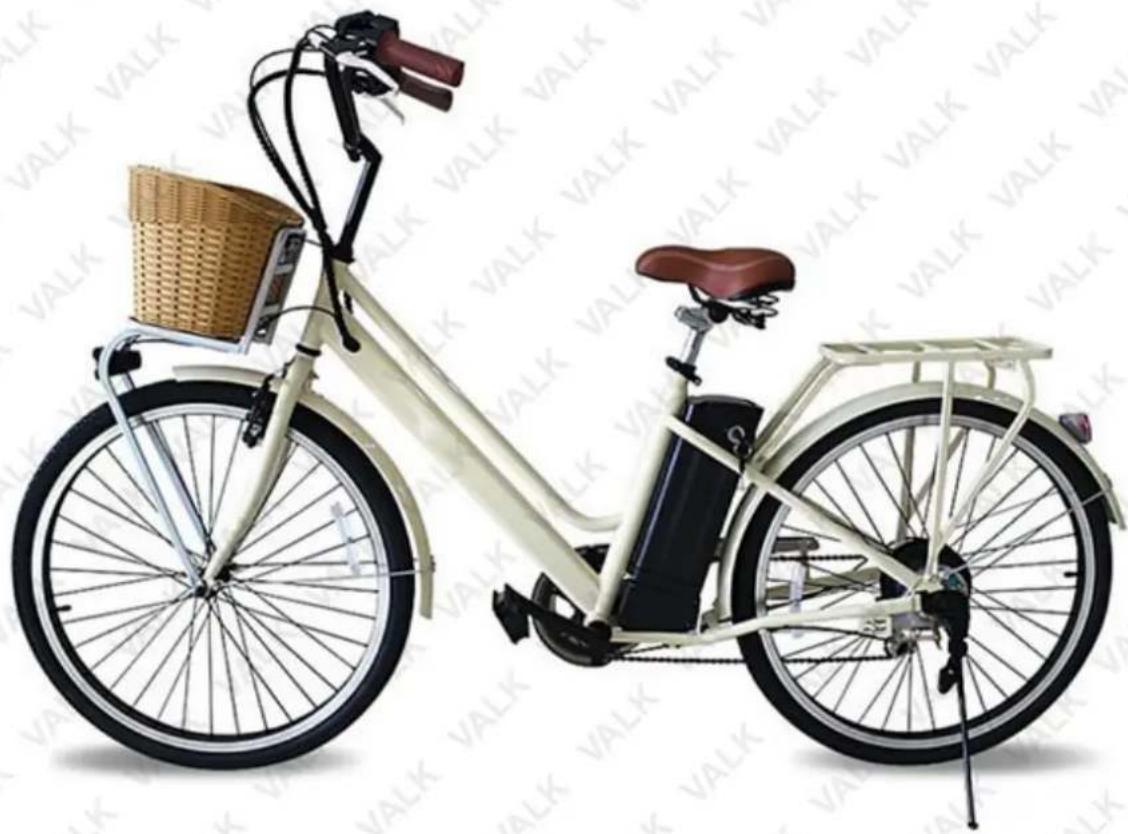
Assembly is complete. The bicycle should resemble the following image. Please note that colours may vary.
natural_image
Exterior view of a modern bicycle with a woven basket and side-mounted battery (no visible text or symbols)Parts List
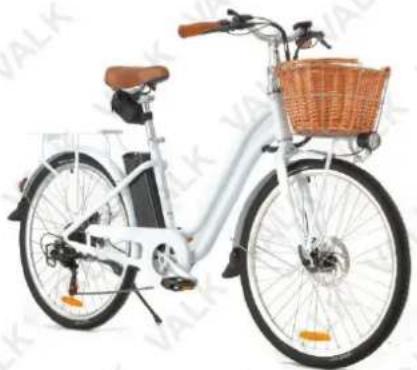
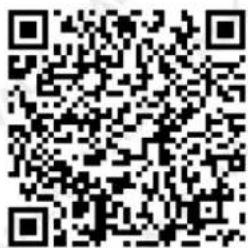
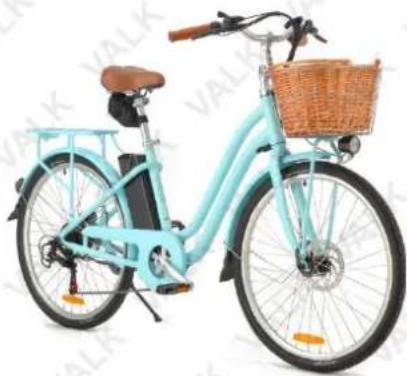
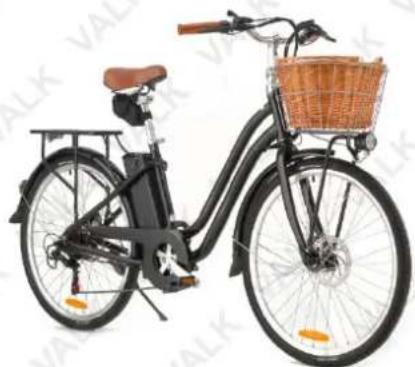
Spare parts available for purchase, scan QR codes below:
QR Code Bike SKU
natural_image
White bicycle with leather seat and woven basket, no visible text or symbolsTRNEBKVLKAVN1
natural_image
Light blue and white bicycle with a woven basket, no visible text or symbolsTRNEBKVLKAVN2

natural_image
Black and white bicycle with a woven basket on its side, no visible text or symbolsTRNEBKVLKAVN3
Operation


Before riding, ensure that all required fasteners are tightened to the correct torque. • Charge the battery prior to use. • Ensure that the pedal assistance system is switched OFF when the bicycle is not in use. • Always wear a helmet and appropriate safety equipment and always keep both hands on the handlebars and both feet on the pedals whilst riding. Read, understand and follow all safety recommendations before riding. • Avoid riding in damp conditions, rain etc as this may affect operation or possibly damage the bicycle electronics.
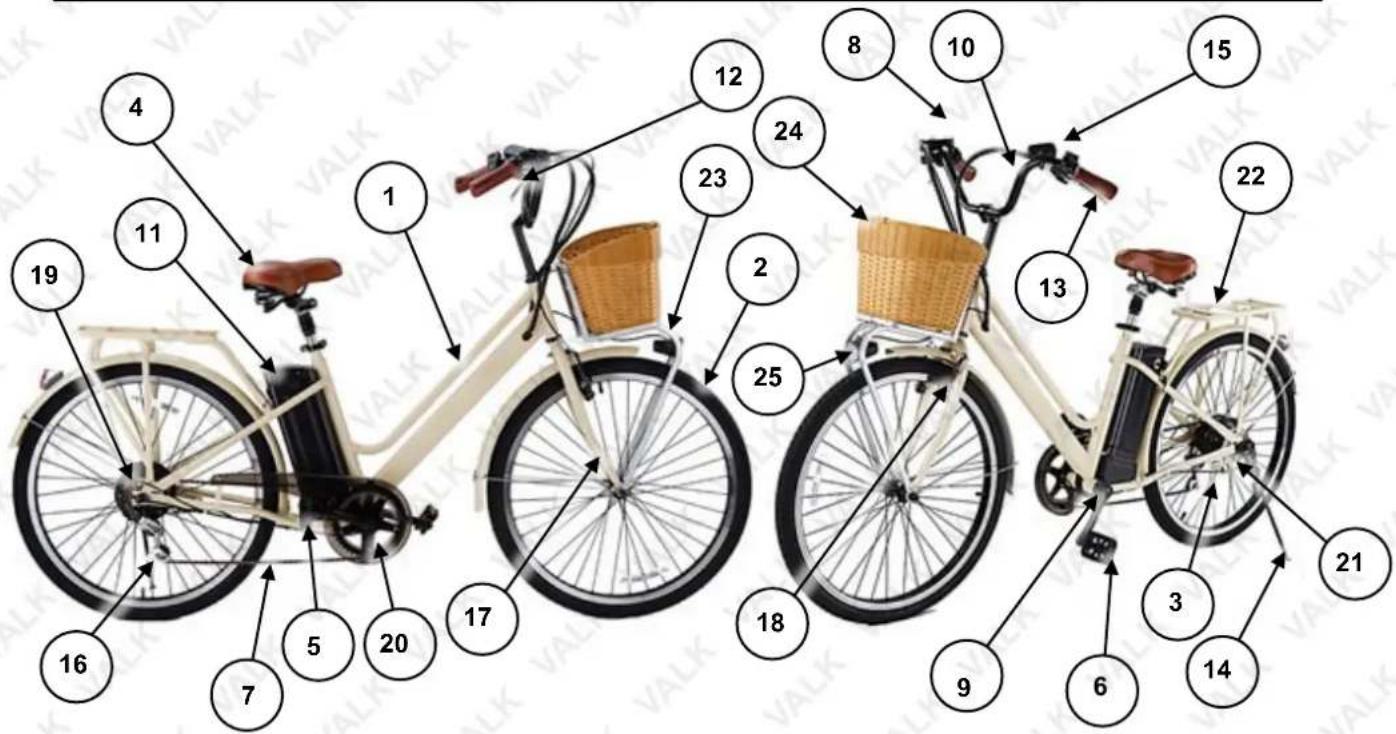
Note: Colours may vary
| No. | Name | No. | Name |
| 1 | Frame | 14 | Kickstand |
| 2 | Front Wheel | 15 | Display and Horn |
| 3 | Rear Wheel and Drive Motor | 16 | Rear Derailleur |
| 4 | Seat Post / Seat | 17 | Front Fork |
| 5 | Pedal (Right) | 18 | Brake Caliper (Front) |
| 6 | Pedal (Left) | 19 | Gear Cluster |
| 7 | Chain | 20 | Chain Wheel |
| 8 | Pedal Assistance / Gear Change Controls | 21 | Drum brake (Rear) |
| 9 | Crank Assembly (Bottom Bracket) | 22 | Rear Rack |
| 10 | Handlebar | 23 | Front Rack |
| 11 | Battery Pack | 24 | Basket |
| 12 | Front Brake Lever | 25 | Headlight |
| 13 | Rear Brake Lever |
Pedal Assistance

Charge the battery prior to use. • Pedal assistance is not mandatory for riding – normal bicycle riding ("pedal power") alone can be used. It is recommended to use pedal assistance when necessary, and not rely on it solely. When using pedal assistance, also pedal for best efficiency. • The bicycle must be moving, or have sufficient pressure placed on the pedals (in a forward direction) to activate pedal assistance. • If you apply the brakes when pedal assistance is active, the drive provided by the motor reduces in proportion to how much braking pressure you apply. Once the bicycle reaches a sufficiently slow speed or stops completely, pedal assistance automatically deactivates.
The bicycle pedal assistance system comprises an electric motor (A) built into the rear wheel hub, a battery pack (B) with key security (C) and charging port (D) (under the handle), pedal assist throttle (E), and display (F).
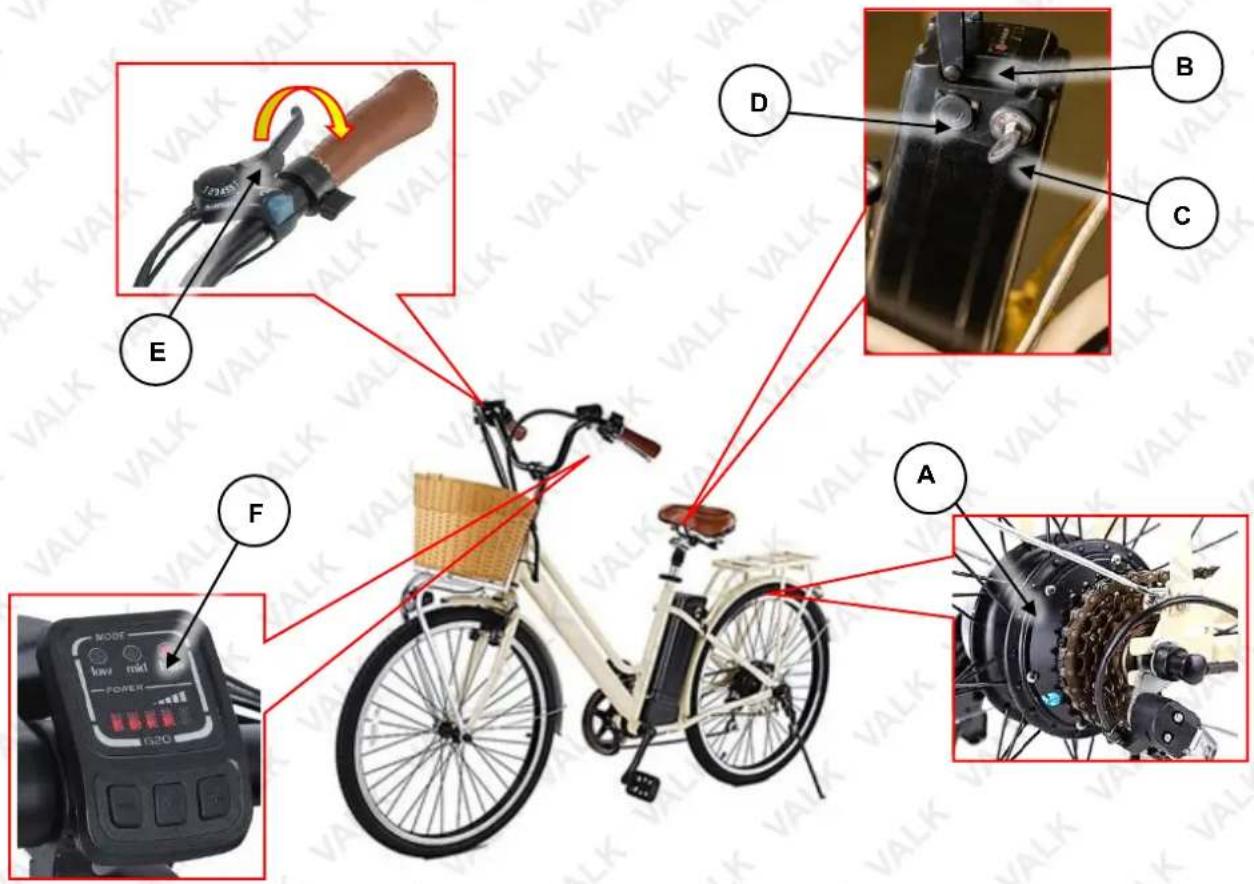
Note: Colours may vary
Using Pedal Assistance
- Place the security key in the battery pack key slot and rotate to the "O" (ON) position. Once the key is in the ON position, it cannot be removed from the key slot.
- Begin moving using pedal power, press the pedal assist throttle downward to activate the motor.
- After riding, rotate the key to the "X" (OFF) position and remove the key.
Understanding the Display
The display has two functions:
- The Mode section consists of three lights which indicate the level of pedal assistance provided.
– Low light: low level assistance / speed.
- Mid light: medium level assistance / speed.
– High light: high level assistance / speed.
- No lights: This allows you to use the throttle control on the handle to control your speed.
- The power section indicates the battery charge level, where one bar is minimum, and five bars is full.
Increase level of assistance
Hold for 3 seconds for ON/OFF
(Security key must be in ON position)
Decrease level of assistance
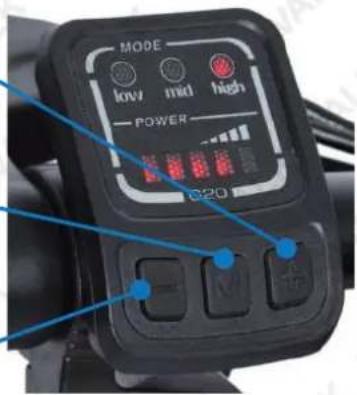
Guidelines for Using Pedal Assistance
To get the best performance and service life from the pedal assistance system, understand and apply the following techniques:
- When pedal assistance is active, the drive motor engages to provide assistance only while the bicycle is in motion and you are pedalling. The amount of assistance provided depends on your pedalling force and the level of pedal ride assistance currently selected (where applicable) and / or being applied.
- Pedal assistance progressively reduces as bicycle speed increases, and stops completely when the current speed exceeds 25kmh. Pedal assistance re-engages when speed drops below 25kmh (provided you are pedalling).
- Start moving from stationary by pedalling as per a normal bicycle. Using pedal assistance only when "pushing off" places undue loads on the system and uses a lot of energy.
- It is recommended to pedal as per a normal bicycle when riding up inclines. Using pedal assistance only when climbing uses a lot of battery energy.
- Pedal assistance automatically reduces or disengages whenever the brakes are activated (and / or when you stop pedalling).
Using Gears
Some model bicycles are equipped with gears. Gears are used to change the ratio between rotations of the rear wheel and the crank set. This enables you to pedal less and travel faster on flat or downhill sections, or pedal faster and travel slower to climb hills. Gearing is independent to pedal assistance, so pedal assistance operates the same regardless of selected gear. Remember, however, that pedal assistance is "governed" by overall speed.
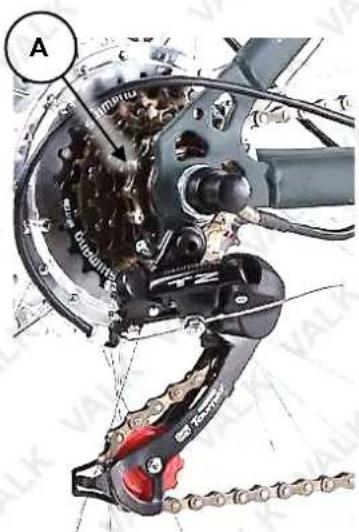
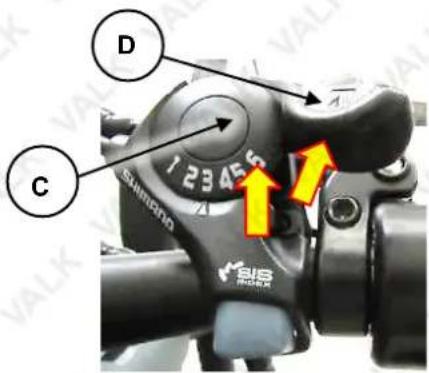
The selectable gears (A) are located on the rear wheel, known as a "gear cluster" or "cassette". The larger the gear, the less number of rotations per rotation of the crank. The largest gear is the "lowest" and is referred to as "1". As each gear becomes smaller, it is a "higher" gear then the previous and is numbered sequentially. The number of gears may vary between different models. Beneath the gear cluster is the derailleur mechanism (B), which moves the chain so it runs on different gears. The derailleur is operated by the rider using controls mounted on the handlebars. The gear change is "indexed" so each gear selection positively engages – this is factory set and should require no adjustment. There may be slight variations between bicycle models in method to change gear "up" (from a lower gear to a higher gear), or to change gear "down" (from a higher gear to a lower gear). The image shows a "6-speed" type that uses a button (C) for changing up gears (push button to activate derailleur), and a lever (D) for changing down gears (rotate lever forward to activate derailleur).
Guidelines for Using Gears
To get the best performance and service life from the gear change system, understand and apply the following techniques:
• You MUST be pedalling during gear changes.
- Do not attempt to change multiple gears in a single action. Allow each gear change to complete fully before the next change.
- Always use an appropriate gear for your speed, the terrain and incline. This helps you ride most efficiently.
- Keep the chain and gears properly lubricated and clean.
- If you notice noise after changing gear or an ability to select a gear or the chain not running smoothly, have the gear system inspected and adjusted by a bicycle mechanic or suitably qualified person.
Using Brakes
All bicycle models are equipped with a front and rear wheel braking system. Brakes are used to slow the bicycle down. The braking systems may use different mechanics, however, the functionality is the same, and that is to change the energy of the moving bicycle into heat energy ("friction"):
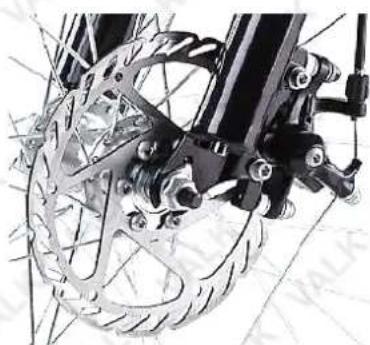
- For disc brakes, this means pads made from a special friction material pinching against a disc mounted to the centre of the bicycle wheel.
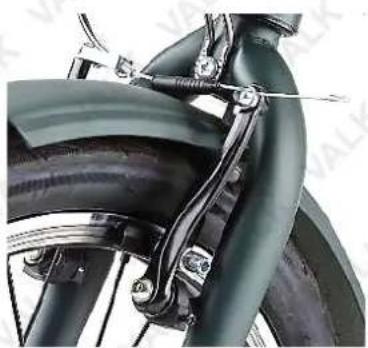
- For rim type "caliper" or "noodle" brakes, this means rubber blocks pinching the outer rim of the bicycle wheel (not the tyre).
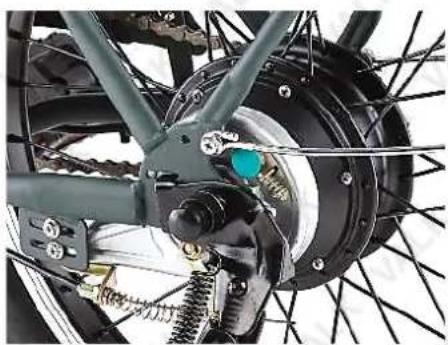
- For drum brakes, this means pushing sections (known as "shoes") of special friction material against the inside of cylinder fixed to the centre of the bicycle wheel.
natural_image
Close-up of a bicycle's front wheel and steering wheel assembly (no visible text or symbols)Typical Disc Brake
natural_image
Close-up of a vintage bicycle frame with visible mechanical components and suspension rings (no text or symbols)Typical Rim Brake
natural_image
Close-up of a bicycle wheel assembly with visible components and suspension lines (no text or symbols)Typical Drum Brake
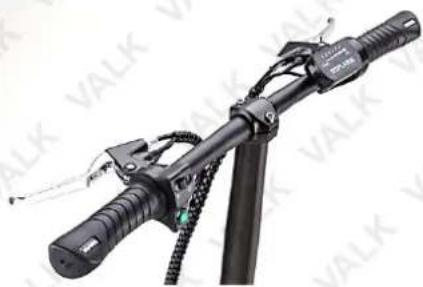
The brakes are operated by the rider through levers mounted to the handlebars. The left-hand lever operates the rear brake, the right-hand lever operates the front brake. The ability of the rider to adequately slow and/or stop the bicycle depends largely on the skill of the rider, the surface being ridden on and other factors such as rain, tyres, adjustment and condition of the brake parts etc.
natural_image
Close-up of a black bicycle brake lever with attached cable and adjustment knobs (no visible text or symbols)Guidelines for Using Brakes
To get the best performance and service life from the brake system, understand and apply the following techniques:
- In wet conditions, which reduces friction, always provide additional distance for braking and adjust how quickly you apply the brakes.
- When applying the brakes, particularly the front brake, use a lower pressure to start with until you feel the brakes starting to "bite", then increase pressure as required. Do NOT over-apply the brakes and cause the wheel to stop rotating – this may result in loss of control.
- Maintain the brake friction components (pads, shoes, rubbers) in good condition and replace when they reach the wear limit.
- Maintain brake adjustment so that the brakes perform effectively, the levers are comfortably positioned, and there is not excessive play in adjustable components.
- If the brakes are not performing effectively, making abnormal noise or any part is not serviceable or cannot be adjusted correctly, have the brakes inspected and adjusted by a bicycle mechanic or suitably qualified person.
- If the brake cables become frayed or otherwise damaged, have them replaced by a bicycle mechanic or suitable qualified person.
Batteries and Battery Charging
Never modify the electrical system. Alterations may cause a fire, resulting in serious injury and could also damage the electrical system. • Charge with the supplied charger only. Use of the wrong charger may cause a fire or explosion, resulting in serious injury. • Ensure the voltage and frequency of the charger is compatible with mains electrical supply. • Use the battery charger in dry locations only. • The battery must be charged before first use. • For maximum battery performance and service life, charge the battery after each use, and charge at temperatures between 0 and 40°C (32 and 104°F). • Battery charging generally takes 4 to 6 hours from discharged to fully charged. Do NOT charge the battery continuously for more than 24 hours. • If the bicycle has not been used for over 4 weeks, charge the battery before use. • Always switch the bicycle OFF after each use.
The battery pack can be recharged repeatedly. However, rechargeable batteries eventually need to be replaced. A significantly reduced operating period after charging indicates that the battery is no longer serviceable and should be replaced. Discard old batteries in an environmentally responsible manner.
The battery charger has a charge status LED indicator:
• Red - Battery charging.
• Green - Battery fully charged.
When the battery is charged (approximately 6 hours), the charger indicator LED illuminates green.
Disconnect the charger from the electrical supply, then disconnect it from the bicycle. Lower the battery pack handle to protect the bicycle charging port.

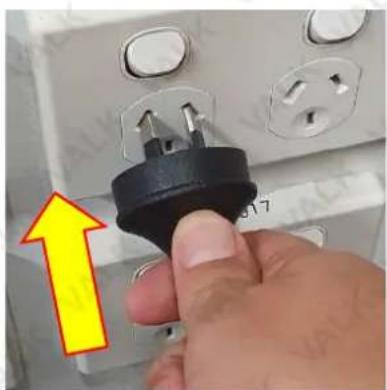
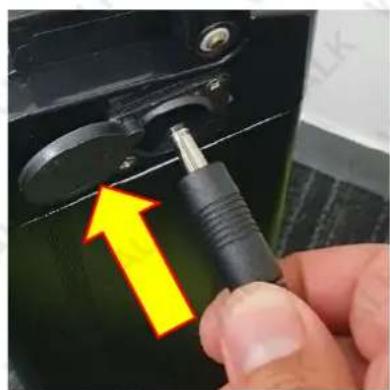
We recommend charging the battery as shown below to avoid power surges which may burn out the fuse.
natural_image
Close-up of a hand holding a black electrical plug with a yellow arrow pointing to it, against an open electrical socket (no text or symbols visible)Step1: Plug power cable into power inlet (Do not switch on).
natural_image
Close-up of a hand using a tool to adjust a component, with a yellow arrow highlighting the process (no text or symbols visible)Step 2: Plug the other end of the cable into the battery.
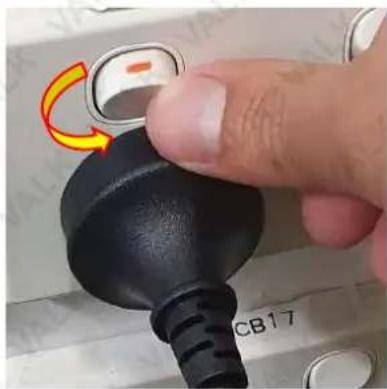
natural_image
Close-up of a finger pressing a black rubber plug with a yellow curved arrow indicating rotation (no text or symbols visible)NOTE: Turn on the power point.
Removing the Battery Pack
- To remove the battery, insert the key into the keyhole in the ON position. Apply pressure to push the key towards the battery pack so that the keyhole is depressed. While it's depressed, turn the key anti-clockwise towards the OFF position.
- The battery pack is now unlocked and can be released from the bicycle. Raise the battery handle and pull the battery upwards to remove it.
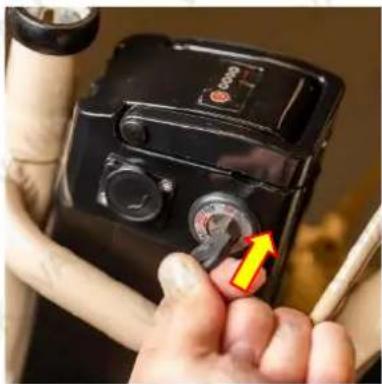
natural_image
Close-up of a hand holding a black digital camera with a yellow arrow pointing to the dial (no visible text or symbols)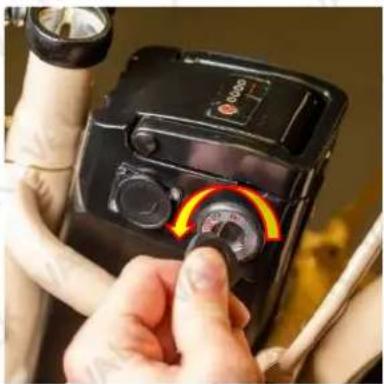
natural_image
Close-up of a hand adjusting a black digital camera with a rotary dial and indicator lights (no visible text or symbols)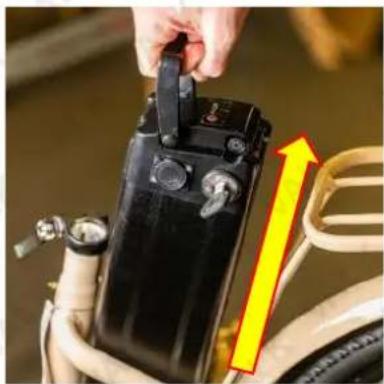
natural_image
Close-up of a hand adjusting a black battery component with a yellow arrow pointing to it, next to a car tire (no visible text or symbols)Maintenance
Some maintenance activities described may be beyond the scope of some users. Do NOT attempt procedures that you are not comfortable with, or do not have the necessary tools, experience or knowledge for – take the unit to an authorised service centre or qualified technician for servicing. Items in the maintenance schedule below that are recommended to be performed by a qualified technician are highlighted yellow. • Failure to follow the maintenance recommendations, using incorrect or non-compatible accessories or replacement parts, or general negligence may result in making the product warranty void. Improper adjustment or service may result in damage to the bicycle or make it hazardous. • Maintenance requirements may be affected by any number of factors from your riding style to geographic location. • When new, parts of the bicycle may "break-in" over the course of the first approximate 100km of riding, possibly including the stretching of cables, spoke tension changes etc. It is recommended to have the bicycle inspected and serviced at an authorised service centre or by a qualified technician. • The bicycle components are subject to wear and stress. If a component is weakened through stress, age etc, it may fail without warning. It is important to regularly inspect the bicycle for any signs of component fatigue – look for cracks, fraying, discoloration etc, as this may indicate that a part is near the end of its useful life and should be replaced.
- Clean the bicycle with a soft, damp cloth – do NOT use high-pressure water cleaners or hoses, pressurised air, solvents, abrasives etc. For the console, battery and motor, do NOT use any liquids.
- When transporting in a vehicle, it is recommended to have the battery out of the bicycle during transport.
- Store the bicycle where it will be protected from rain, sun etc to help prevent corrosion, fading etc.
- For safety, longest possible service life and reliability, maintain the bicycle properly. Use the maintenance schedule below for guidance. It is very important that you check certain systems and components before each and every ride. The proper condition and function of these systems is critical to your safety.
| Maintenance Schedule | ||||
| Component / Condition | Check Before Every Ride | *Check Periodically | Clean / Lubricate | Adjust / Tighten / Replace as Required |
| Tyre Pressure | ■ ■ | |||
| Tyre Wear / Damage | ■ ■ | |||
| Brake Adjustment | ■ ■ | |||
| Handlebar Tightness | ■ ■ ■ | |||
| Controls and Displays | ■ | |||
| Seat Post Tightness | ■ ■ | |||
| Fasteners / Mounting Hardware | ■ | |||
| Brake Pads / Shoes | ■ ■ | |||
| Brake Cable Wear | ■ ■ | |||
| Chain | ■ ■ | ■ | ||
| Reflectors | ■ | |||
| Battery / Charger | ■ ■ | |||
| Steering Head Bearings | ■ ■ | ■ | ||
| Derailleur | ■ ■ | ■ | ||
| Wheel Spoke Tension | ■ ■ | |||
| Wheel Trueness | ■ ■ | |||
| Wheel Bearings | ■ ■ | ■ | ||
| Bottom Bracket (Crank) Bearings | ■ ■ | ■ | ||
* Every 5 to 10 rides depending on ride length and conditions.
Battery Storage
When storing the batteries for a long period of time:
- Charge the batteries at least every 30 days to avoid capacity loss. Batteries slowly self-discharge when unused over a long period. If the battery cells are left at a critically low charge state, the lifespan and capacity will be permanently reduced.
• Always disconnect the charger from the mains electrical supply and battery before storing the battery. - Avoid storing batteries in extreme temperatures, whether hot or cold. The recommended battery storage temperature is between 0 and 25°C (32 to 77°F). Avoid exposing batteries to temperatures at or above 40°C (104°F) for extended periods.
- Batteries are best kept in a cool, dry place. Do not allow batteries to accumulate condensation, as this may cause shorting or corrosion.
Battery Fuse

NOTE: Available only in some models. Use fuses of the same type only – the rating (in Amperes) is printed on the end of the fuse. • If the fuse "blows" regularly, have the bicycle inspected at an authorised service centre.
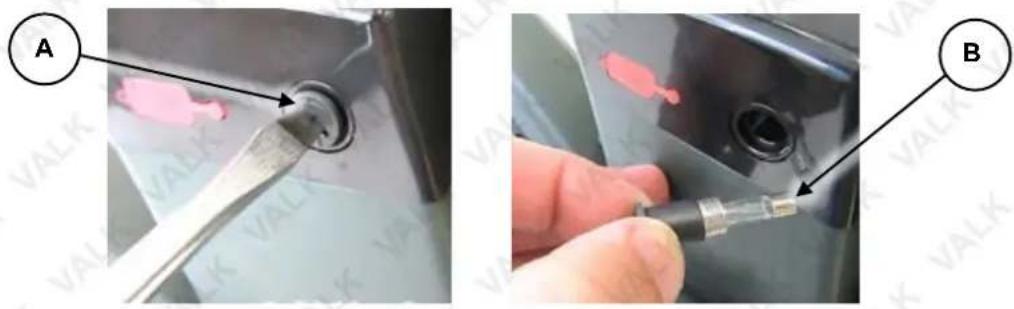
The bicycle battery / electrical system may feature fuse protection to prevent damage in the event of a short-circuit, overload or over-current situation. For example, if the electrical system is exposed to excessive moisture. On some model bicycles, the fuse is accessible and can be easily replaced. If the fuse is "blown", the bicycle electronics will not be available until the fuse is replaced. To replace the fuse:
- Using a suitable screwdriver, remove (rotate left) the fuse holder (A) on the battery pack until fully unscrewed, then pull the fuse holder and fuse (B) from the bicycle.
- Discard the blown fuse. Insert the replacement fuse into the fuse holder.
- Insert the fuse and fuse holder to the bicycle, and re-install (rotate right) the fuse holder until fully seated.
natural_image
Two-step photo showing a tool applying material to a black circular component, labeled A and B (no text or symbols on the main image)Video Tutorial:
How to Check the Fuse

Brakes
Cable Adjustment
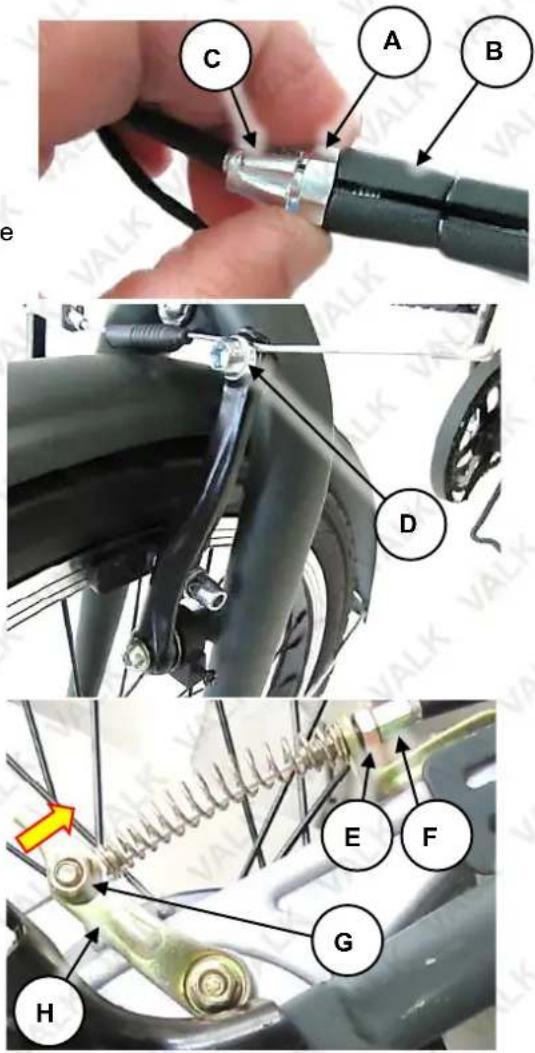
The brake levers are fitted with cable adjusters to compensate for cable stretch and/or adjust how much lever travel is required to activate the brake. A looser cable requires more lever travel to activate the brake, a tighter cable requires less lever travel to activate the brake. Do not over-tighten the brake cable as this may cause the brake to drag when not being pulled, which will affect the performance. Set brake adjustment so there is enough free-play at the lever for a comfortable reach and brake action, however, NOT so much that the lever can be pulled back to the handlebar. The brake can be adjusted at the lever and at the brake caliper:
- Rotate the lock nut (A) on the brake lever (B) to the left (anti-clockwise) to loosen it, then rotate the cable screw (C) left (anti-clockwise) to tighten the cable, or right (clockwise) to loosen the cable, as required.
- When adjustment is complete, tighten the lock nut (rotate right). Check that the wheel can spin freely when the brake is not being applied, and that it cannot be rotated when the brake is applied.
If the cable cannot be adequately adjusted at the lever, further adjustment can be made at the brake caliper.
- If the cable cannot be adjusted using the lever, re-adjust it so the brake cable is fully slack. Using a 5mm Allen key, loosen the cable bolt (D) sufficiently so that the cable can be pulled through it. Pull the cable through the cable bolt until close to being taught, then tighten the bolt to the specified torque using a torque wrench. Check adjustment, and re-adjust if necessary as described above.
For rear drum brakes, the cable at the drum can be used for adjustment, as follows:
- If the cable cannot be adjusted using the lever, re-adjust it so the brake cable is fully slack. Using 8 and 10mm spanners, loosen the lock nut (E), then rotate the adjustor (F) "out" (left or anti-clockwise) to tighten the cable, or "in" (right or clockwise) to loosen the cable as necessary. Tighten the fasteners to the specified torque using a torque wrench. The cable bolt can also be used – loosen the cable bolt nut (G) sufficiently using a 10mm spanner so that the actuation lever (H) can be moved forward, and the cable can be pulled through the cable bolt. Pull the cable through the cable bolt until close to being taught, then tighten the bolt to the specified torque using a torque wrench. Check adjustment, and re-adjust if necessary as described above.
Brake Rubber Alignment and Adjustment
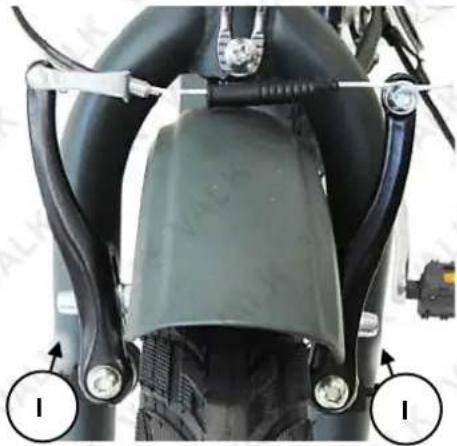
As brake rubbers wear, the distance between the friction material and the rim increases. To reduce clearance, follow the cable adjustment procedure above. The calipers feature adjustment screws (I) that can
be used to adjust the spring tension on each brake arm, so that the brake rubbers contact the rim at the same time when the brakes are applied, and also retract evenly from the rim when the brake lever is released. Brake rubber clearance should be minimised, however, not so that the rubbers touch the rim when the brakes are not being applied. Brake rubbers should be changed when the friction material is 5mm or less.
- Using a suitable Phillips head screwdriver, rotate each adjustment screw as required – right (clockwise) to move the brake arm away from the rim (effectively increasing brake rubber clearance); left (anti-clockwise) to move the brake arm toward the rim (effectively reducing brake rubber clearance).
natural_image
Close-up of a motorcycle's front wheel and side-mounted sensors (no visible text or symbols)Brake Rubber Replacement
Replace the front brake rubbers when the friction material reaches approximately 5mm in thickness. To replace rubbers:
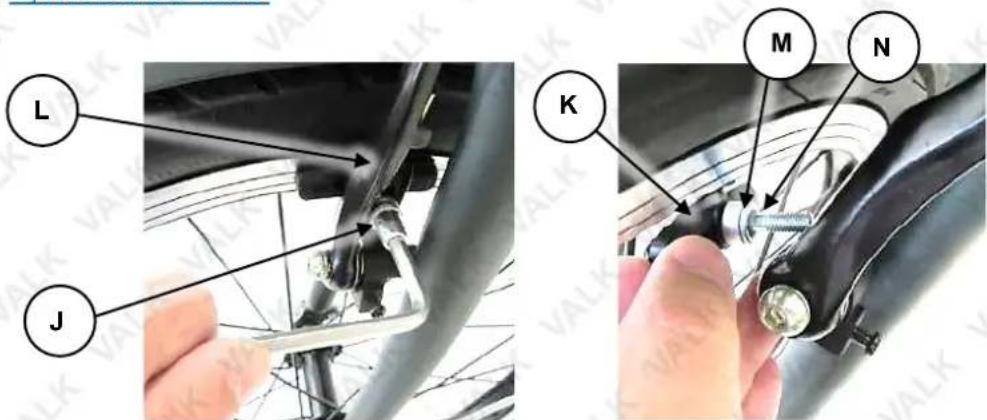
- Using a 5mm Allen key, remove (rotate left / anti-clockwise) the brake rubber nut (J), spacers and washer.
- Remove the brake rubber (K) and spacers from the brake arm (L).
- Place the spacers onto the brake rubber stud, thicker spacer first (M) with concave surface facing out, then thinner spacer (N) with convex surface facing in (so it locates inside the thicker spacer).
- Insert the new brake rubber through the brake arm, then place the spacers and washer onto the brake rubber stud, thinner spacer first with convex surface facing out, then thicker spacer with concave surface facing in (so it locates over the thinner spacer), followed by the washer and brake rubber nut.
-
Hold the brake rubber in position so it is aligned with the wheel rim (that is, not touching the tyre and not at an angle to the rim), then tighten (rotate right) the brake rubber nut to the specified torque using a 5mm Allen key and torque wrench.
-
Adjust the brake rubber alignment and clearance.
-
Adjust the brake cable.
Brake Shoe Replacement

Drum brakes are more complicated than other brakes types. It is recommended to have drum brakes serviced by a bicycle mechanic or suitably qualified person. Before attempting this procedure, note that it involved partially removing the rear wheel, altering chain adjustment and removing the chain from the chain wheel.
Replace the rear brake shoe when you can no longer adjust the brake adequately or it is making noise when being applied. To replace the shoe:
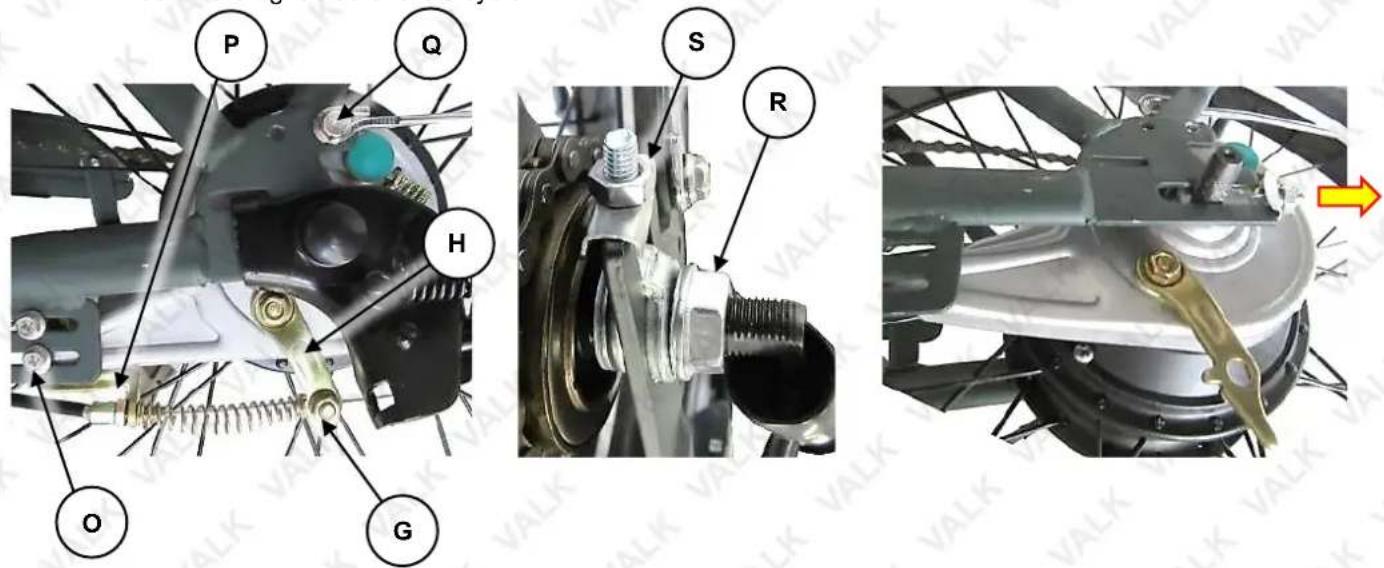
- Using a 10mm spanner, remove (rotate left / anti-clockwise) the cable bolt nut (G), then extract the cable bolt from the brake actuation lever (H). R
- Using 6 and 8mm spanners, remove (rotate left / anti-clockwise) the 2 bolts and nuts (O) securing the cable bracket (P), and remove the bracket.
- Using a 10mm spanner, remove the bolts (Q) securing the rear mudguard to the frame.
- Remove any axle caps or wiring shields from the rear axle, then using a 18mm spanner, loosen (rotate left / anti-clockwise) the axle nut (R) on either side of the bicycle. It is recommended to remove the nut on the left-hand side of the bicycle so the kickstand can be removed.
- Using a 10mm spanner, loosen the adjustor nuts (S). They need to be unscrewed sufficiently so the wheel can be moved forward enough to allow the chain to be lifted off the sprockets.
- Push the wheel forward, then unhook the chain from the chain wheel (front sprocket). Rotate the chain wheel so the chain comes off completely. Move the chain off the rear sprocket, then carefully pull the rear wheel so the axle comes out of the slots in the frame. Be careful not to stretch or pull the motor wires on the right side of the bicycle
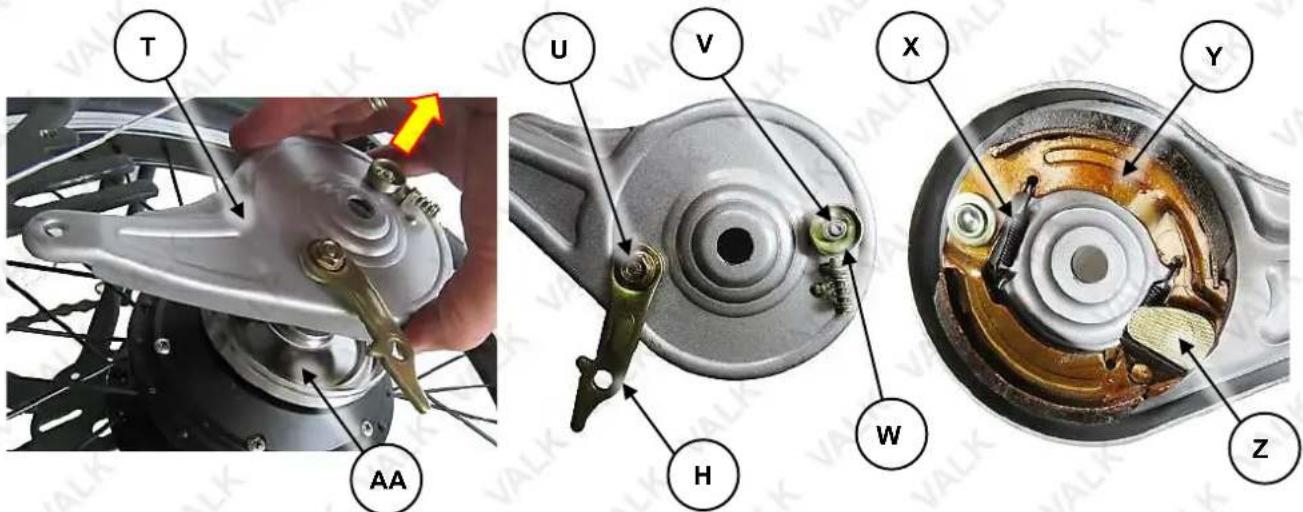
- Pull the adjustor and brake housing (T) off the axle.
- Using 8 and 10mm spanners, unscrew nuts (U) and (V) and remove the actuation lever (H) and adjusting cylinder (W).
- On the inside of the brake housing, unhook the retraction spring (X) from the housing, then remove the shoe assembly (Y). The actuation cam (Z) will also come out.
- Clean the brake housing components and the drum (AA) on the rear wheel. Do not use oil based solvents or liquids. Use a suitable brake cleaning product (methylated spirits can also be used).
-
Install the replacement shoe assembly into the brake housing, then insert the actuation cam (Z) between the two shoes – you may have to push the shoes apart slightly so that cam can be fully inserted.
-
Hook the retraction spring (X) to the housing and brake shoe assembly.
-
Re-install the actuation lever (H) and adjusting cylinder (W) and secure them using the previously removed nuts (U and V). Ensure that the lever is in the correct position (as shown).
-
Slide the brake housing onto the axle, followed by the adjustor.
-
Carefully insert the rear wheel back into the frame – the axle has "flats", so it can be inserted one way only. Push it in as far as the adjustors will allow (this should be far enough into the frame so the chain can be put on the sprockets again).
-
Place the chain around the rear sprocket, then hook it onto the chain wheel, then rotate the crank so the chain is properly engaged with both sprockets.
-
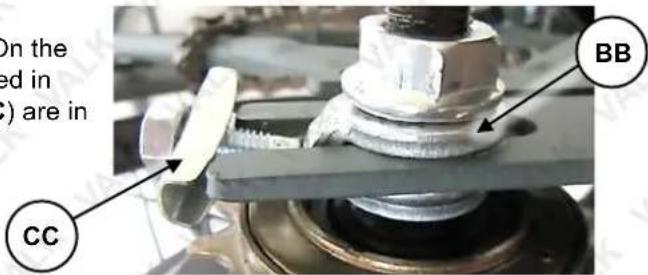
Place the kickstand into position on the left side. On the right side, ensure the tabbed washer (BB) is located in the slot in the bicycle frame, and the adjustors (CC) are in position, engaging with the frame.
-
Adjust the chain.
-
Adjust the brake cable.
Tyre Pressures
The tyres must always be inflated to the correct pressure (as specified on the tyre sidewall) before every ride. Riding the bicycle with either too low or too high pressures will affect bicycle performance, may affect effective electrical assistance range, and may render the bicycle as dangerous. Use an accurate pressure gauge when checking pressures.
Chain Care
The chain periodically requires lubrication, depending on frequency of use and conditions etc. If the chain is noisy or running roughly, lubricate it by applying a small amount of bicycle chain lubricant to it. Do not allow the lubricant to get on to the tyres.
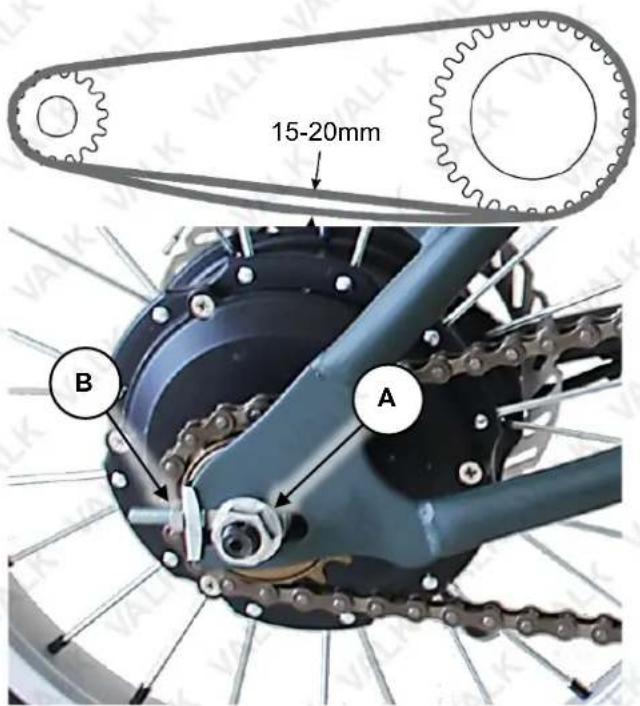
For bicycles without derailleur type gears, the chain tension should be set so that there is approximately 15 to 20mm of free-play. If the chain or drive sprockets requires any maintenance further than lubrication and basic chain tensioning, contact an authorised service centre. To adjust chain tension:
- Using a 19mm spanner, loosen the axle nuts (A) on either side of the bicycle, just enough so they are not clamping up hard against the frame. The axle may have caps on the ends – remove the caps.
- Using a 10mm spanner, rotate the adjustor nut (B) on the chain side of the bicycle to adjust chain tension. Rotate the nut right (clockwise) to increase chain tension (reduce free-play); rotate left (anti-clockwise) to reduce chain tension (increase free-play).
- Pull the wheel to the side so it is aligned straight with the frame – check that the wheel is straight by looking down the length of the chain – it should be perfectly straight between front and rear sprockets.
- Using a torque wrench, tighten the axle nuts to the specified torque. Re-install any axle caps.
Torque Settings
It is important to regularly check all fasteners for adequate tightness. The following are considered highly important, and should be adjusted to the specified torque values using a suitable bicycle torque wrench, sockets and adaptors. Depending on bicycle model and design, some fasteners listed below may not be applicable:
- Front Axle Nut – 35Nm
- Rear Axle Nut – 35Nm
• Handlebar Clamp Bolt – 10Nm
• Handlebar Neck Lock Bolt - 15Nm
• Handlebar Stem Bolt – 24Nm - Pedal Bolts – 35Nm
- Brake Caliper Mounting Bolt – 7Nm
- Brake Cable Anchor Bolt – 7Nm
Frequently Asked Questions
Is it normal for batteries to get warm when charging?
Yes, it is normal that the batteries will become warm during the charging process.
How long will my batteries last before needing replacement?
Average battery life depends on use and conditions. Even with proper care, rechargeable batteries do not last forever. Generally, lithium-ion batteries will last more than 800 charge-discharge cycles. A partial charge/discharge counts fractionally against those numbers; discharging the battery to 50% then recharging it completely uses up one half of a charge cycle.
"End of useful life" refers to the point at which a battery can no longer supply 60% or more of its original rated ampere-hour (Ah) capacity. At this point, degradation of the battery being able to be fully charged accelerates and the battery will need to be replaced.
What happens if the battery discharges while riding?
Pedal assistance will stop when battery charge reaches a minimum level (check level on the console, if applicable). Lights (if applicable) may still function for a period. Your bike can be ridden without pedal assistance.
Troubleshooting
| Malfunction | Possible Cause | Possible Solution |
| Pedal assistance not working | Under-charged battery.Battery no longer serviceable.Battery charger faulty.Motor electrics or switches damaged / faulty. | Charge battery.Follow battery care procedures.Have battery checked. Replace if faulty.Have charger checked. Replace if faulty.Seek diagnosis and repair from authorised service centre. |
| Reduced range and/or speed | Under-charged battery.Battery no longer serviceable.Low tyre pressure.Brakes dragging.Terrain, headwind, etc. | Charge battery.Follow battery care procedures.Have battery checked. Replace if faulty.Inflateto recommended pressure.Adjust.Normal. |
| Gear change (where applicable) rough / not changing | Derailleur cables sticking / stretched / damaged.Derailleurs / shifter not correctly set. | Lubricate / adjust / replace cables.Adjust. |
| Chain slip / jumping off sprockets | Worn sprockets.Stretched chain.Front sprocket loose / out of true.Sprocket teeth bent / broken.Derailleur / shifter not correctly adjusted. | Replace.Replace.Re-true / tighten.Replace.Adjust. |
| Clicking noises when pedalling | Stiff chain link.Loose pedals / bearings.Loose bottom bracket / bearings.Bent bottom bracket or pedal bolt.Loose pedal arm bolts. | Lubricate chain.Tighten / adjust bearings.Tighten / adjust bearings.Replace.Tighten. |
| Grinding noise when pedalling | Pedal bearings too tight.Bottom bracket bearings too tight.Rear wheel not straight.Chain too tight.Derailleur dirty. | Adjust.Adjust.Alignso chain straight.Adjust.Clean and lubricate. |
| Brakes not effective | Pads worn.Pads / discs dirty.Brake cables binding / stretched / damaged.Brakes levers binding.Brakes require adjustment. | Replace.Clean and degrease.Lubricate / adjust / replace cables.Clean pivots.Adjust. |
| Brakes squeal | Pads / discs dirty.Brakes not centred.Caliper fasteners loose. | Clean and degrease.Centre brakes and adjust.Tighten. |
| Brakes chatter / vibrate | Brake mounting bolts loose.Brakes out of adjustment.Steering head bearings loose. | Tighten.Centre brakes and adjust.Adjust bearings. |
| Wheel vibration / wobble | Axle bent or broken.Wheel out of true.Wheel hub bearings loose / not serviceable.Quick-release (if equipped) mechanism loose. | Replace.True wheel.Adjust / replace.Adjust. |
| Steering not accurate | 1. Wheels not aligned to frame.2. Steering head loose / binding.3. Front forks or frame bent. | 1. Align wheels.2. Adjust.3. Straighten. |
| Motor "clicks" / has reduced power and/or shuts off | 1. Under-charged battery.2. Motor internal fault. | 1. Charge battery. Follow battery care procedures.2. Replace. |
| No power when pedal assistance switched ON | 1. Blown fuse.2. Loose connectors / wiring damage.3. Faulty switch.4. Faulty controller. | 1. Replace.2. Check connectors / wiring. Replace as required.3. Replace.4. Replace. |
| Pedal assistance OK, but no display | 1. Loose connectors / wiring damage.2. Faulty controller. | 1. Check connectors / wiring. Replace as required.2. Replace. |
| Display OK, but no pedal assistance | 1. Loose motor connectors / wiring damage.2. Poor contact at battery terminals.3. Faulty braking sensor. | 1. Check connectors / wiring. Replace as required.2. Inspect and clean terminals.3. Replace. |
| Bicycle runs at full speed without pedalling | 1. Faulty crank sensor.2. Faulty throttle.3. Faulty controller. | 1. Replace.2. Replace.3. Replace. |
| Throttle(if equipped) not returning to neutral position | 1. Grip jamming against throttle.2. Faulty throttle. | 1. Reposition grip so gap to throttle is 1 to 2mm.2. Replace. |
| Pedal assistance operating intermittently or not as expected | 1. Loose connectors / wiring damage.2. Faulty controller.3. Faulty crank sensor.4. Faulty throttle. | 1. Check connectors / wiring. Replace as required.2. Replace. |
| Charger shows "full charge" in an unusually short amount of time | 1. Faulty charger.2. Faulty batteries. | 1. Replace.2. Replace. |
| Charger indicator not illuminating when charger is plugged into outlet | 1. Outlet has no power.2. Faulty charger. | 1. Check charger plugged in and electrical supply ON.2. Replace. |
| Charger indicator flashes red and never changes to green | 1. Damaged wire from charger to battery.2. Faulty batteries. | 1. Replace charger.2. Replace. |
Specifications
| Battery | 36V 10Ah Li-ion battery |
| Battery Range | Up to 40km (with pedal assist) |
| Max Speed 25km/h | |
| Frame Material Aluminium Alloy | |
| Motor 250W Brushless | |
| Gears | Shimano 7-speed-gears |
| Brake | Front and rear disc brakes |
| Wheels 26" | |
| Mode Pedal assist | |
| Max Rider Weight 120kg | |
| Power plug | Australian standard |
| Charge Time | 6-8 hrs |
| Input voltage | 240V AC |
Note: Minimal Assembly required
Some experts believe that the incorrect or prolonged use of almost any product may cause serious injury or death. To help reduce your risk of serious injury or death, refer to the information below. For more information, see www.datastreamserver.com/safety
Consult all documentation, packaging and product labelling before use. Note that some products feature documentation available online. It is recommended to print and retain the documentation.
Before each use, check the product for loose/broken/damaged/missing parts, wear or leaks (if applicable). Never use a product with loose/broken/damaged/missing parts, wear or leaks.
■ Products must be inspected and serviced (if applicable) by a qualified technician every 6 months. This is based on average residential use by persons of average size and strength, and on a property of average metropolitan size. Use beyond these recommendations may require more frequent inspections/servicing.
■ Ensure that all users of the product have completed a suitable industry recognised training course before being allowed access to the product.
The product has been supplied by a general merchandise retailer that may not be familiar with your specific application or description of application. Be sure to attain third-party approval from a qualified specialist for your application before use, regardless of any assurances from the retailer or its representatives.
This product is not intended for use where fail-safe operation is required. As with any product (for example, automobile, computer, toaster), there is the possibility of technical issues that may require the repair or replacement of parts, or the product itself. If the possibility of such failure and the associated time it may take to rectify could in any way inconvenience the user, business or employee, or financially affect the user, business or employee, then the product is not suitable for your requirements. This product is not intended for use where incorrect operation or a failure of any kind, including but not limited to, a condition requiring product return, replacement, parts replacement or service by a technician may cause financial loss, loss of employee time or an inconvenience requiring compensation.
If this product has been purchased in error when considering the information presented here, contact the retailer directly for details of their returns policy, if required.

©2022 Valk. All rights reserved. No part of this document, including descriptive content, concepts, ideas, diagrams or images may be reproduced or transmitted in any form or by any means, electronic or mechanical, including photocopying, scanning or recording, or any information storage and retrieval system, without express permission or consent from the publisher.